A290
Introduction
The Emergency Stop Assist function is a driving aid that automatically acts on the steering and braking of your vehicle when it detects situations where you no longer have your hands on the wheel or are no longer watching the road.
Depending on the vehicle, the system is associated with the following driving aids:
- the "Driver attention warning" Driver attention warning and/or "Driver fatigue warning" Driver fatigue warning functions (Operation A);
and/or
- the "Active driver assist" system Active driver assist (Operation B).
Depending on which function or system is activated, the "Emergency Stop Assist" is ready to intervene when:
- the driver ignores visual and audible warnings emitted when signs of distraction or fatigue are detected (Operation A);
The driver ignores the various levels of visual and audible warnings emitted in the event of non-detection of hands on the steering wheel (Operation B).
For both operating modes A and B, once the "Emergency Stop Assist" function is activated, the system:
- keeps the vehicle in the lane while maintaining a safe distance from the vehicle in front (vehicle being followed);
- slows the vehicle to a complete stop if the driver does not react to the various warnings.
warning
This system provides an additional driving aid.
The function cannot, under any circumstances, be a substitute for the driver's responsibility during driving.
The driver must always adapt their driving according to their alertness and fatigue level, regardless of the system's indications.
The system may not detect all situations that would require the driver to be warned in advance.
The driver must always keep control of their vehicle in all circumstances and driving situations.
There is a risk of accident.
Location of components
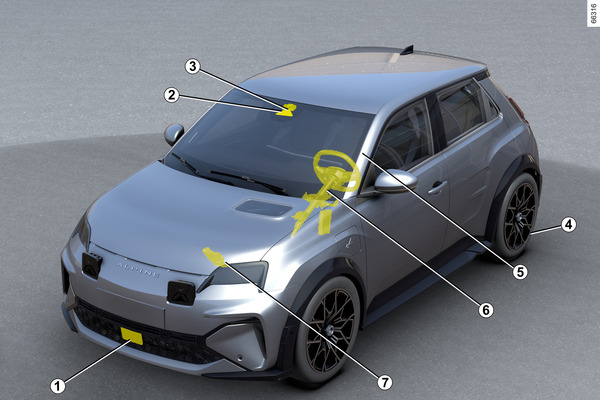
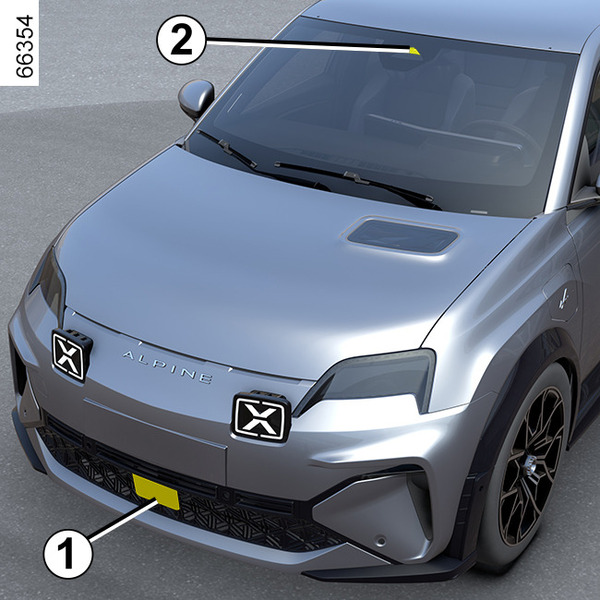
- 1.
Radar.
Calculates the distance between your vehicle and the vehicle in front (followed vehicle).
The system's maximum range is approximately 130 metres. This may vary according to the road conditions (ground relief, weather conditions, etc.)
Ensure that the radar area is not obstructed (dirt, mud, snow, a badly fitted front number plate), impacted, modified (including painting) or hidden by any accessory fitted on the front of the vehicle (on the grille or logo etc.).
- 2.
Camera.
Detects markings on the ground and the position of vehicles on the various traffic lanes.
Make sure the windscreen is not obscured (by dirt, mud, snow, etc.).
- 3.
Computer.
The computer associated with camera 2 uses the information from radar 1. It complements them and cross-references them with the information from the camera to determine the vehicle's trajectory and speed in order to adjust its behaviour (position in the lane or braking).
In addition, it controls the system on/off settings.
Depending on the vehicle, it also processes information to detect the presence of the driver's hands on the steering wheel.
- 4.
Electronic parking brake.
It keeps the vehicle stationary under certain conditions.
- 5.
Interior camera.
It allows the system to analyse the behaviour of the driver's face and detect signs of distraction or fatigue.
Make sure that the camera is not obscured (by dirt, mud, etc.) or covered.
- 6.
Power-assisted steering.
It operates the front wheels to guide the vehicle trajectory according to the information transmitted by the computer 3.
- 7.
Active vehicle control.
This system provides information on vehicle dynamics to the computer 3 (speed, lateral acceleration, etc.) and acts on the braking system to control deceleration and to keep the vehicle stationary.
Operation
warning
This function is an additional driving aid. The driver can intervene to regain control of their vehicle.
Operation A
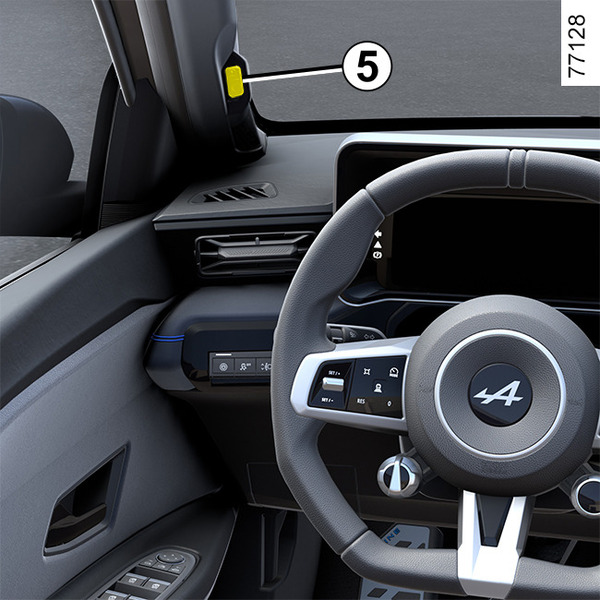
The system is activated from around 12 mph (20 km/h), when the driver ignores the visual and audible warnings issued if signs of distraction or fatigue are detected by the interior camera 5.
Note: the system does not record any images and operates in real time.
For more information on how the "Driver attention warning" Driver attention warning and/or "Driver fatigue alert" Driver fatigue warning functions work.
Operation B
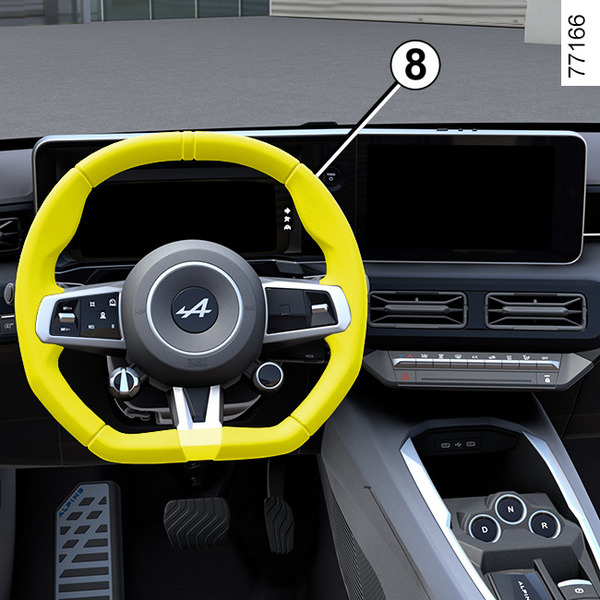
The system is triggered from approximately 6 mph (10 km/h), if the driver ignores the various visual warnings (including the display of the
 warning light in red) and audible warnings emitted in the event that hands are not detected on the steering wheel 8.
Note: it is prohibited to fit any accessories to the steering wheel (protective cover, etc.).
For more information on the operation of the Active driver assistActive driver assist.
Emergency stop procedure
The procedure and stopping conditions for the "Emergency Stop Assist" function are identical whether in operating mode A or B.
Once triggered:
- the "Emergency Stop Assist" function keeps your vehicle in its own lane and maintains a safe distance from the vehicle in front (vehicle being followed), thanks to the information provided by radar 1 and camera 2;
- the hazard warning lights come on automatically and the "Emergency Stop Keep control" message is displayed on the instrument panel accompanied by the
warning light in red and a beep;
- your vehicle's brakes are then applied in increments to encourage you to regain control. If you do not react, the system gradually slows down your vehicle until it comes to a complete stop;
- once the vehicle has stopped, the "Emergency Stop performed" message is displayed on the instrument panel, still accompanied by the beep. The system keeps the vehicle immobilised.
warning
The braking and lane-keeping performance of the Emergency stop assist function is limited.
The system is not able to ensure that the vehicle is kept in its lane when:
- the system no longer detects lines;
- the lane is too narrow;
- the bend is too sharp;
- ...
There is a risk of accident.
After the vehicle stops:
- the hazard warning lights remain on;
- the opening elements unlock automatically;
- the
warning light remains red until the driver regains control of the vehicle;
- the electronic parking brake 4 is automatically applied approximately three minutes after the vehicle has stopped.
warning
Do not remain stationary in the traffic lane.
Regain control of your vehicle and get to safety.
There is a risk of accident.
The driver can interrupt the Emergency stop assist function and regain control of the vehicle at any time (during the manoeuvre or during the stopping phase) by carrying out a separate action or a combination of actions.
Depending on the vehicle, the possible actions are:
- pressing hard on the accelerator pedal;
- pressing hard on the brake pedal (while the vehicle is moving);
- turning the steering wheel abruptly;
- pressing the brake pedal while changing the gear lever position;
- carrying out an action on the electronic parking brake;
- carrying out a moderate action on the accelerator pedal, accompanied by a moderate action on the steering wheel;
- slightly rotating the steering wheel while pressing button (0) on the steering wheel;
- slightly rotating the steering wheel while pressing the accelerator pedal;
- slightly rotating the steering wheel while pressing the brake pedal.
tip
If the Emergency satop Assist function is triggered, the Active driver assist function will be deactivated if it was previously activated. Regain control of your vehicle as soon as possible, during the manoeuvre or during the stopping phase.
Once you have regained control of your vehicle, you can manually reactivate the system.
Activation/deactivation
warning
For safety reasons, carry out any adjustments while the vehicle is stationary.
Activation/deactivation - Operation A
tip
Depending on the vehicle and on the length of time following the last time the engine was stopped, the alerts are reactivated:
- when the vehicle is unlocked;
or
- when a door is opened;
or
- when the engine is started.
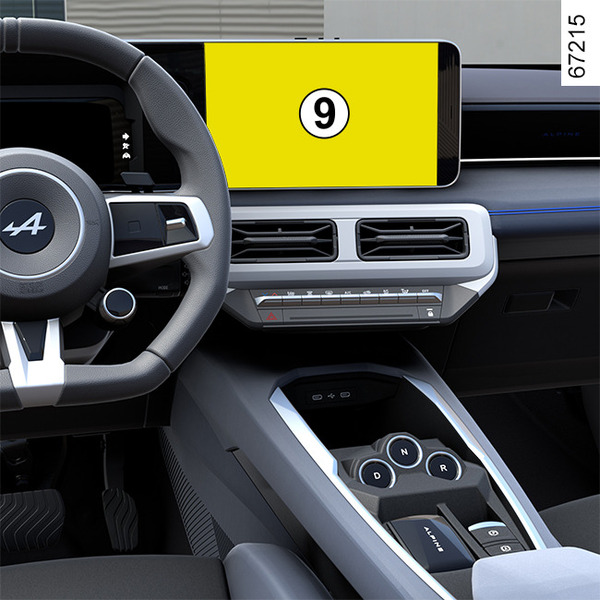
From the multimedia screen 9, to activate or deactivate the Emergency Stop Assist function it is necessary to activate at least one of the following two functions beforehand:
- « Distraction alert » ;
- « Fatigue Alert ».
Then to activate or deactivate the setting:
- "Emergency Stop Assist".
Please refer to the multimedia instructions for more information.
Note: one the setting is activated, it will automatically be associated with the two "Driver Attention Warning" and "Driver Fatigue Warning" functions.
Special features of "My Safety"
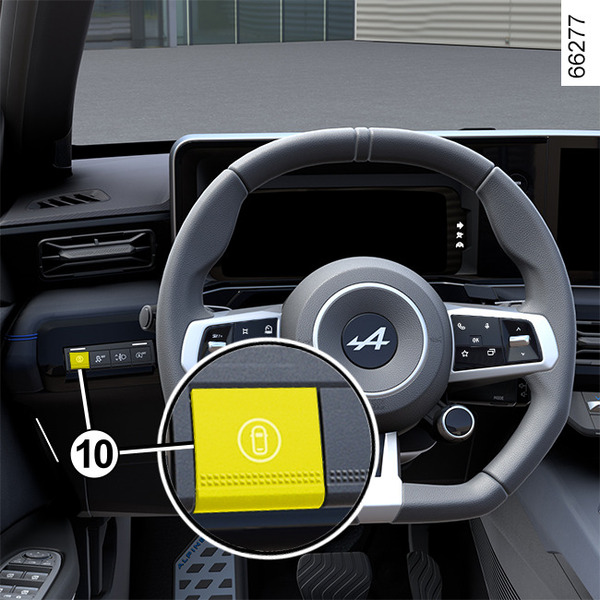
The use of button 10 to activate or deactivate the "Driver Attention Warning" and/or "Driver Fatigue Warning" function can be configured in "Perso" mode of the "My Safety function My Safety.
Activation/deactivation - Operation B
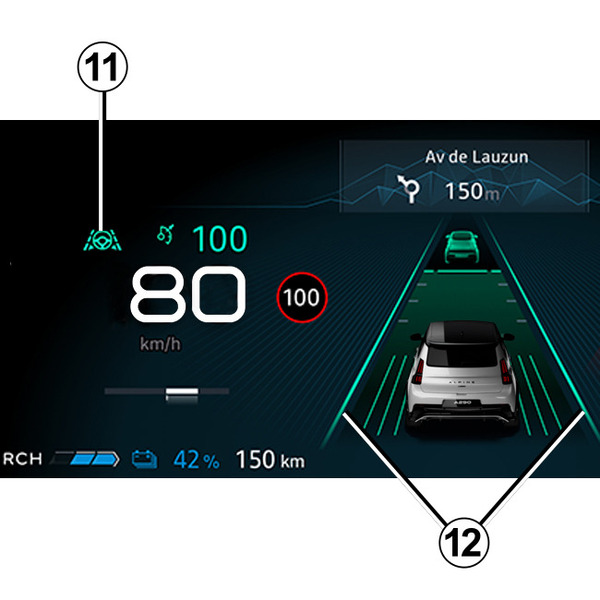
Emergency Stop Assist is automatically activated when the "Active driver assist" system is selected Active driver assist.
The green 11
 warning light and the left-hand and right-hand line indicators 12 are displayed on the instrument panel to confirm that the "Lane Centring" function is in operation. It intervenes and guides your vehicle in the lane.
Operational limits
In some situations, the system can still provide braking but cannot guarantee that the vehicle will stay in its lane.
Examples:
- the system no longer detects the lines or only one line is detected in your lane;
- the lane width is too narrow or too wide;
- in some driving conditions (roundabout, intersection, the bend is too sharp, etc.);
- the vehicle is subject to significant lateral or longitudinal accelerations;
- depending on the vehicle, if the speed is greater than approximately 99 mph or 112 mph (160 km/h or 180 km/h);
- the front camera 2 is disturbed by environmental conditions (glare from the sun, heavy rain, obstruction, dirt, mud, snow, fog, etc.).
If degraded visibility of the front camera 2 is detected, this is often accompanied by the display of the "Front camera no visibility" message on the instrument panel.
In these conditions, the system's braking performance will be reduced. Regain control of the vehicle as soon as possible.
Temporarily not available
The system is temporarily unavailable in the following situations:
- the vehicle is driven on a very winding road;
- depending on the vehicle, if the speed is greater than approximately 99 mph or 112 mph (160 km/h or 180 km/h);
- the system detects degraded visibility of the front radar.
- ...
In the event of a blackout in the area of the front radar 1 or a disruption of its signal, the "Front radar no visibility" message is displayed on the instrument panel. This may also be accompanied by the "Driving assist unavailable" message.
Ensure that the radar area 1 remains clean and is not obstructed by snow, mud, a badly fitted/attached number plate or by any accessory fitted on the front of the vehicle (on the grille), or hidden by any accessory fitted on the front of the vehicle (on the grille or badge, etc.).
Some areas may disrupt or damage the system operation, for example:
- arid zones, tunnels, long bridges or lightly used roads without road lines, without signs or trees nearby;
- an airport or military zone;
- if the interior camera 5 is obstructed, even partially (Operation A);
- when the driver's face is not detected (operation A).
Operating faults
If the system detects a fault, the system is deactivated and the "Driving assist unavailable" message is displayed on the instrument panel.
Depending on the type of malfunction, the following messages may be displayed on the instrument panel accompanied, depending on the vehicle, by the
 warning light:
- « Check Front camera » ;
- « Front radar to check » ;
- « Check Camera/Radar » ;
- « Check Driving assist ».
Consult an approved Dealer.
If driver distraction or fatigue is detected:
- "Vigilance monit. to check" accompanied by the
 warning light on the instrument panel (operation A).
If the message remains, contact an approved dealer.
Warnings
warning
The "Emergency Stop Assist" function is an additional driving aid. It does not, under any circumstances, exempt the driver of their responsibility in keeping control of the vehicle.
The driver must always adapt their driving according to their alertness and fatigue level, regardless of the system's indications.
Decreased driver attention, or fatigue, may not be detected by the system or may not be detected in time. Stay focused on driving and take regular breaks.
There is a risk of accidents.
In certain situations (undetected lane markings, lane that is too narrow or too wide, roundabout, intersection, sharp bend, sun glare, heavy rain, obstruction, dirt, mud, snow, fog, etc.), the system cannot guarantee that the vehicle will remain in its lane.
Remain vigilant.
The braking performance of the "Emergency Stop Assist" function is limited. The system can brake the vehicle up to a third of the braking capacity.
In the event of reduced visibility of the front camera, the braking performance of the system will be reduced.
Regain control of the vehicle as soon as possible.
System servicing/repairs
- In the event of an impact, the radar and/or camera alignment may be changed and its operation may consequently be affected. Deactivate the system and consult an authorised dealer.
- Any work in the proximity of the radar and/or camera (replacements, repairs, windscreen modifications, paintwork etc.) must be carried out by a qualified professional.
Only an authorised dealer is qualified to service the system.
In the event of system disturbance
Some conditions can disrupt or damage the system operation, for example:
- obstruction of the windscreen or the radar area (by dirt, ice, snow, condensation etc.) Frequently check the cleanliness and condition of the windscreen, front wiper blades and front bumper;
- a complex environment (tunnel, metallic structure, etc.);
- poor weather conditions (snow, heavy rain, hail, black ice, etc.);
- poor visibility (night, fog, etc.);
- poor contrast between the vehicle preceding it and the surrounding area (e.g. white vehicle in a snowy area, etc.);
- being dazzled (glaring sun, lights of vehicles travelling in the opposite direction; etc.);
- narrow, winding or undulating road (tight bends, etc.);
- tar lines detected as a line by the system;
- narrowing/widening lanes;
- the road markings are multiple (roadworks, etc.), difficult to distinguish or irregular (e.g. partially or very faded lines, lines too far apart, uneven road surface, etc.);
- a vehicle with a significant difference in speed;
- the driver wears certain types of glasses (Operation A);
- the interior camera is obstructed, even if partially (Operation A);
- part of the driver's face is covered (by hair, a cap, surgical mask, scarf, etc.) (Operation A);
- an unsuitable driving position, such as sitting too low, too tilted, etc. (Operation A);
- the driver is wearing gloves on or holds the steering wheel very lightly.
In these cases:
- Risk of inadvertent braking.
- Risk of unwanted, incorrect correction or no correction of trajectory.
Many unforeseen situations may affect the system operation. Certain objects or vehicles that might appear in the camera or radar detection zone may be interpreted incorrectly by the system, possibly leading to inappropriate braking.
Deactivating the system
You must deactivate the system if:
- the vehicle is towing a trailer or a caravan;
- the front camera area has been damaged (e.g. interior or exterior windscreen area); the windscreen is cracked or distorted;
- the radar area has been damaged (impacts, etc.);
- the interior camera area has been damaged (Operation A);
- the surface of the steering wheel is damaged or damp.
In the event of the system behaving abnormally, deactivate it and contact an authorised dealer.