A290
Introduction
The "Active driver assist" is a driving aid system for use outside built-up areas, on wide roads with visible lines.
This system consists of the "Adaptive cruise control"Stop and Go adaptive cruise control and "Lane centring" functions.
The system enables you to:
- maintain vehicle speed based on a previously stored speed;
- adjust the distance between your vehicle and the vehicle in front;
- direct the trajectory of the vehicle in the lane;
- adapt the vehicle speed to the speed shown on the road signs, automatically or after confirmation by the driver (depending on the vehicle).
warning
This system provides an additional driving aid.
It can under no circumstances replace the driver's responsibility to respect speed limits and safe distances and to be vigilant.
The system may not detect all situations that would require the driver to be warned in advance.
The driver must always keep control of their vehicle in all circumstances and driving situations.
The driver must always adapt their speed according to the surroundings and traffic conditions.
There is a risk of accidents.
The adaptive cruise control function.
Depending on the country, based on information from a radar or camera or map data sent via a GSM connection, the Stop and Go adaptive cruise control gives you the option of maintaining a selected speed, known as the cruising speed, while keeping a safe distance from the vehicle in front in the same lane.
The cruising speed can be adjusted automatically to a speed limit change (depending on the country).
If the vehicle in front stops, the adaptive cruise control may brake your vehicle to a complete stop before setting off again.
warning
Important: you should keep your feet near the pedals and your hands on the steering wheel at all times to prepare for any event.
The system controls acceleration and deceleration of your vehicle using the engine and braking system.
The adaptive cruise control function can be activated from 0 mph (0 km/h) according to road conditions (traffic, weather, etc.).
It is represented by the
 Stop and Go adaptive cruise control symbol.
Note:
- the driver must observe the maximum speed limit and safe distances according to the legislation in the country where they are driving;
- the adaptive cruise control can brake the vehicle up to a third of the braking capacity. Depending on the situation, the driver may need to brake harder.
tip
The adaptive cruise control does not trigger an emergency stop and its braking capability is limited.
For more information on the adaptive cruise control function (activating cruise control, cruise control with speed limit sign recognition, adjusting the cruising speed, following distance, overtaking, temporary unavailability, system operation limitations, etc.) Stop and Go adaptive cruise control.
The "Lane Centring" function
Using information from a camera, the "Lane Centring" function intervenes in the steering system to direct the vehicle in the lane.
This function is only available when Active driver assist is activated.
If the conditions allow it, the function may be activated:
- from 0 mph with a vehicle in front. Once activated, the function may intervene;
or
- from approximately 31 mph (50 km/h) without a vehicle in front. Once activated, the function may intervene from approximately 19 mph (30 km/h).
The "Lane Centring" function is a comfort feature.
On the instrument panel it is represented by the
 warning light.
Note: in the event of a sharp bend, the function's lateral retention capacities are limited and require the driver to take immediate action on the steering wheel.
Additional information
Depending on the vehicle, the "Active driver assist" function may be used with other driving aid functions.
Interaction with the "Lane departure prevention" function
When the "Lane Centring" function is in adjustment mode, it will automatically suspend the "Lane departure prevention" function if this was activated Lane departure prevention. When the "Lane Centring" function is not controlling the steering system, the "Lane departure prevention" function may be reactivated if conditions allow.
Location of components
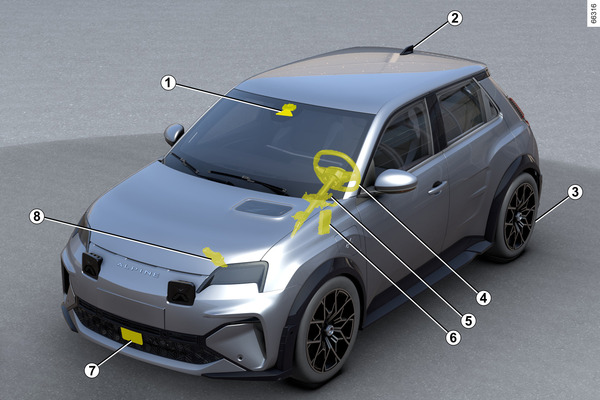
- 1.
Camera.
Detects markings on the ground and the position of vehicles on the various traffic lanes.
It receives information from the radar 7 and merges it with its own information to determine the trajectory and speed of the vehicle (acceleration/braking). Amongst other things, it controls the system activation/deactivation parameters (door opening status, etc.).
Depending on the vehicle, it processes information to detect the presence of the driver's hands on the steering wheel.
Make sure the windscreen is not obscured (by dirt, mud, snow, etc.).
- 2.
Aerial and maps.
(depending on the country)
Road maps and certain driving conditions (roundabouts and cornering) are downloaded according to the journey taken by the vehicle. The system can anticipate deceleration following a change of the speed limit indicated on road signs, depending on the parameters selected by the driver.
The system can also adjust the vehicle's speed when approaching a tight bend or roundabout.
- 3.
Electronic parking brake.
It the vehicle stationary under certain conditions.
- 4.
Torque sensor.
Depending on the vehicle, it detects hands on the steering wheel.
- 5.
Power-assisted steering.
It operates the front wheels to guide the vehicle trajectory according to the information transmitted by the computer 6.
- 6.
Engine computer.
It controls and directs the engine to carry out the required acceleration.
- 7.
Radar.
Calculates the distance between your vehicle and the vehicle in front.
The system's maximum range is approximately 150 metres. This may vary according to the road conditions (ground relief, weather conditions, etc.)
Ensure that the radar area is not obstructed (dirt, mud, snow, a badly fitted front number plate), impacted, modified (including painting) or hidden by any accessory fitted on the front of the vehicle (on the grille or logo etc.).
- 8.
Active vehicle control.
This system provides information on vehicle dynamics to the computer 6 (speed, lateral acceleration, etc.) and acts on the braking system to control deceleration and to keep the vehicle stationary.
warning
The radar and camera zones must be kept clean and free of any tampering in order to ensure the proper operation of the system.
Controls
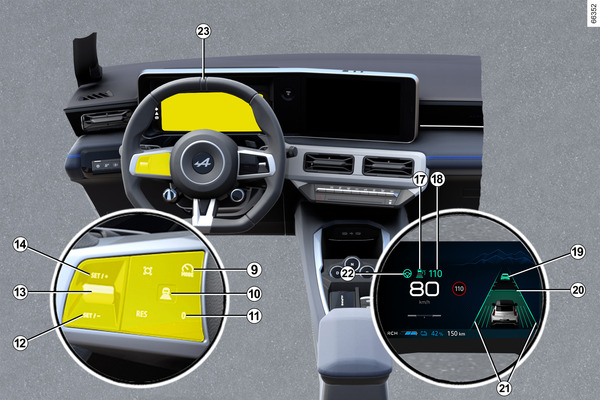
- 9.
Switch for selecting/deselecting the driving aids, depending on the vehicle:
- the Active driver assist;
- adaptive cruise control;
- speed limiter;
- OFF.
- 10.
Safe distance settings
- 11.
Put the function on standby (and store the limit speed) (0).
- 12.
- Recall the stored cruising speed (RES).
- 13.
- Upwards: activates, increases cruising speed or stores the current speed (SET/+).
- Downwards: activates, decreases cruising speed or stores the current speed (SET/-).
- 14.
Pop-up button (depending on the vehicle): adapt the speed setpoint to detected speed limits
 Detection of road signs.
Depending on the vehicle, if the "OFF" mode is selected before switching off the engine, the "Speed Limiter" function will be activated by default the next time the vehicle is started.
Displays on the instrument panel
- 17.
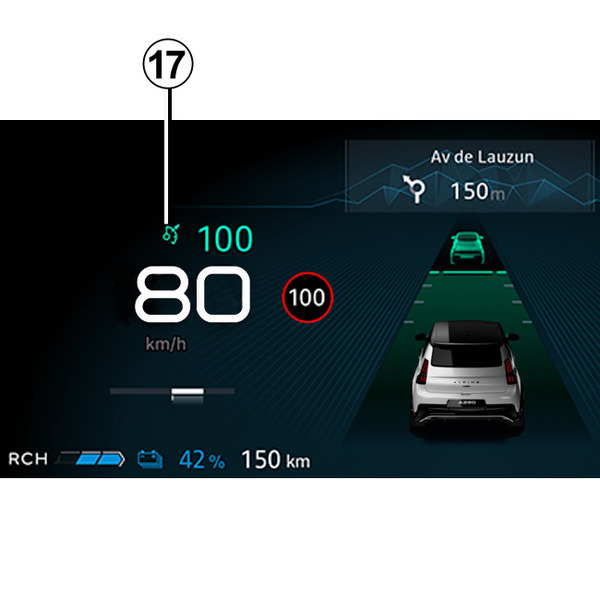
"Stop and Go adaptive cruise control" function warning light
 .
.- 18.
Stored cruising speed.
- 19.
Vehicle in front.
- 20.
Stored safe distance
- 21.
Left-hand and right-hand line indicators
- 22.
"Lane centring" function warning light
.- 24.
Hands-off steering wheel detection warning light
 .
.
Steering wheel 23
The driver must always keep their hands on the steering wheel.
If the driver turns the steering wheel with enough force, the "Lane centring" function is interrupted to enable the driver to regain control of the vehicle.
If the driver does not handle the steering wheel (no hands are detected) the "Lane centring" function is deactivated after several alerts.
Activating/deactivating the " Active driver assist " function
Activating the function
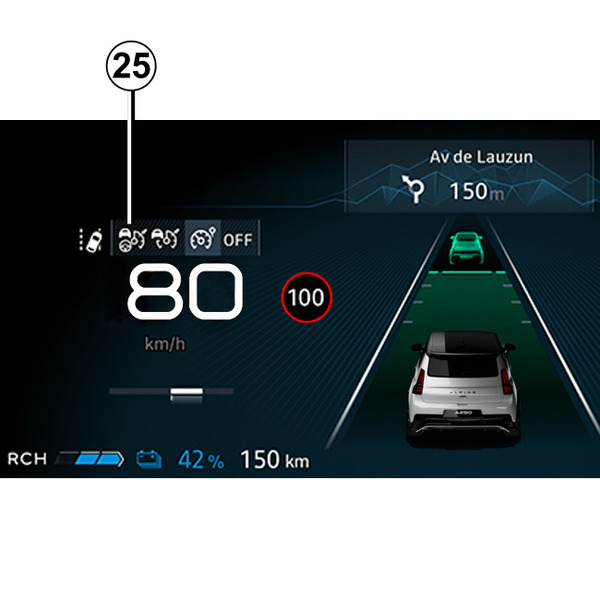
To activate the function, press the switch 9 as many times as required to select the icon 25 on the instrument panel.
The "Lane Centring" function 22
warning light and the
warning light are displayed in grey on the instrument panel.
Then press the steering wheel control 13 upwards (SET/+) or downwards (SET/-). The "Active driver assist", consisting of the Adaptive cruise control Stop and Go and the "Lane Centring" function, is then activated.
Note: depending on the vehicle, when the vehicle is started, the speed limiter is automatically selected if the function 25 or OFF was selected the last time the vehicle was stopped.
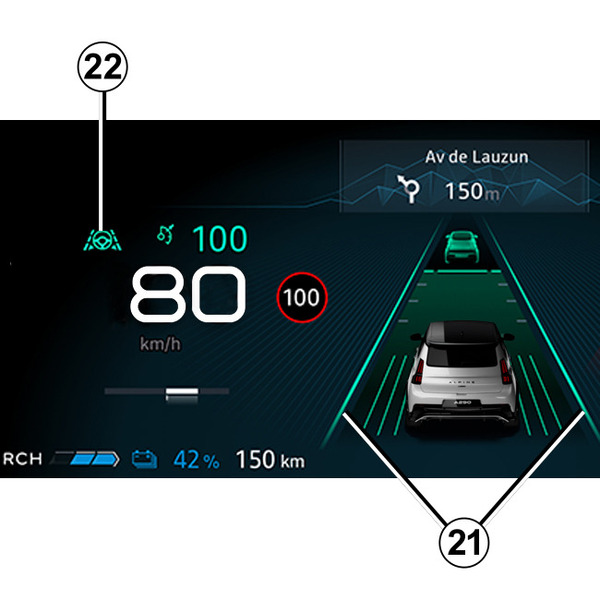
The green 22
warning light and the left-hand and right-hand line indicators 21 are displayed on the instrument panel to confirm that the "Lane Centring" function is in operation. It intervenes and guides your vehicle in the lane.
You can interrupt the "Lane centring" function at any time by forcefully turning the steering wheel. As soon as you stop turning the steering wheel, the "Lane centring" function automatically reactivates once conditions allow it to.
Note: you must keep your hands on the steering wheel when using the "Lane centring" function. Under no circumstances should you take your hands off the steering wheel.
Deactivating the function
Press the switch 9. The deactivation of the function is confirmed by the disappearance of the 22
warning light and the right-hand and left-hand line indicators 21 on the instrument panel.
Note: if the "Lane departure prevention" function was previously activated and the conditions allow, it will automatically reactivate.
tip
To exit the driving assistance, press switch 9 as many times as necessary until you reach OFF. The "Driving assist. deactivated" message is displayed on the instrument panel.
In this case, depending on the vehicle, the next time the engine is started, the "Speed Limiter" function will be activated and waiting for a speed limit to be stored.
Adjusting the position in the lane
(depending on the vehicle)
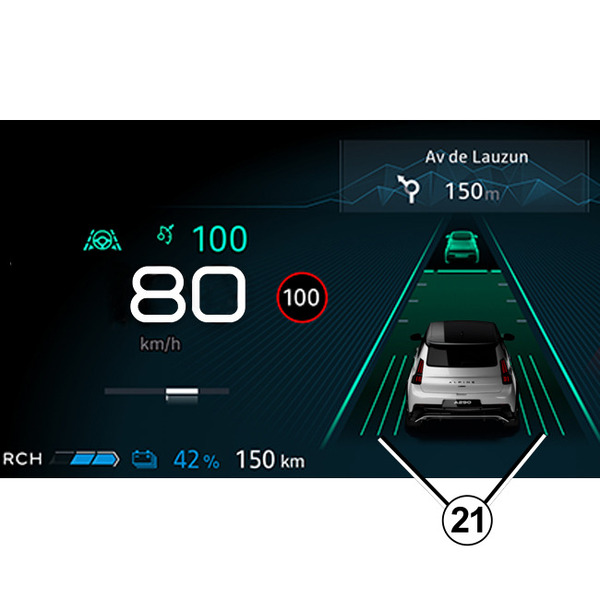
To activate the lane position adjustment, the following conditions must be met:
- the "Lane Centring" function must be in operation with the warning light 22 displayed in green on the instrument panel;
- the vehicle speed must be below approximately 31 mph (50 km/h);
- the vehicle must be travelling on a high-speed road;
- the vehicle must be in a sufficiently wide and straight lane.
Once these conditions are met, you can adjust the lateral position of your vehicle in the lane without deactivating the "Lane Centring" function.
To do this:
- turn the steering wheel slightly to the right or left to adjust/offset your vehicle in the lane until you reach the desired position;
- maintain the pressure on the steering wheel for about 10 seconds: the position of the vehicle is automatically calculated according to speed, lane width and line type;
- relax your hold on the steering wheel: the vehicle maintains the offset position and the 21 arrows displayed on the instrument panel indicate that the adjustment has been applied.
Note: in certain driving conditions, such as when approaching bends and reaching a speed over approximately 43 mph (70 km/h), the vehicle may be automatically recentred.
To return to the centre of the lane, turn the steering wheel slightly in the opposite direction, then stop trying once the vehicle has reached the centre of the lane.
"Lane Centring" function on standby
The "Lane Centring" function is put on standby automatically in the following cases:
- the lane markings are no longer detected by the system or are detected on one side only;
- the lane width is too narrow or too wide;
- the system does not detect any hands on the steering wheel;
- in some driving conditions (roundabout, intersection, the bend is too sharp, etc.);
- the vehicle speed is below approximately 19 mph (30 km/h), without a vehicle in front;
- the vehicle crosses a line;
- the system is temporarily disrupted (for example: camera obscured by dirt, mud, snow, condensation, etc.).
Certain actions carried out by the driver also suspend the "Lane Centring" function:
- activating the indicators;
- turning the steering wheel with enough force.
The function is confirmed to be on standby by the appearance of the grey warning light 22
and the left-hand and right-hand line indicators 21 on the instrument panel.
Once the conditions are met, the function again adjusts and maintains the vehicle's position in the lane. The 22
warning light and the left-hand and right-hand line indicators 21 are displayed in green on the instrument panel.
Special cases
The system anticipates certain situations (approaching a lane delimitation line, etc.) that may cause the "Lane Centring" function to be put on hold.
In this case, the 22
warning light and the left-hand or right-hand line indicator 21 are displayed in yellow on the instrument panel to warn the driver.
In some cases (if the camera is unable to detect lines, etc.), the system is put on hold and a beep sounds.
warning
Important: you should keep your feet near the pedals and your hands on the steering wheel at all times to prepare for any event.
tip
You can affect the vehicle trajectory at any point by turning the steering wheel.
" Keep hands on steering wheel " warning

When the vehicle speed is above approximately 6 mph (10 km/h), if the Active driver assist system no longer detects your hands on the steering wheel, several warning levels will be triggered:
- after approximately 15 seconds, the "Keep hands on steering wheel" message appears in yellow on the instrument panel;
- after approximately 30 seconds, the "Keep hands on steering wheel" message and the 24
warning light appear in red on the instrument panel, accompanied by a beep;
- after approximately 35 seconds, if the driver does not put their hands back on the steering wheel following the warnings, the system will be deactivated and emit a beep. The Emergency Stop Assist function is triggered automaticallyEmergency Stop Assist.
tip
In the first two alert levels, when the system again detects the presence of the driver's hands on the steering wheel, the system stops the alerts. The function continues to direct the vehicle in the lane.
Note: in some situations, the "Lane Centring" function may no longer detect your hands on the steering wheel and may emit an alert:
- the driver is holding the steering wheel very lightly;
- the driver is wearing gloves;
- ...
In the case of a sharp bend
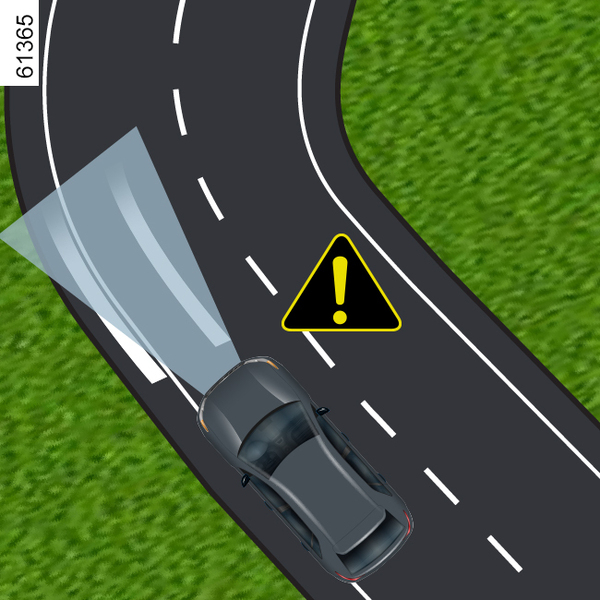
In the case of a sharp bend, and depending on the vehicle speed, the function's side retaining capacities will be limited and require the driver to carry out immediate action on the steering wheel so that the vehicle remains in the lane.
If the driver does not intervene, the function triggers a vibration of the steering wheel to signal that the vehicle is about to breach a line and that the driver needs to carry out immediate action.
The warning light 22
and the left-hand or right-hand line indicator 21 are displayed in red on the instrument panel.
If the vehicle crosses a line completely and moves out of its lane or if the bend is too sharp, the "Lane centring" function is put on standby.
The function is confirmed to be on standby by the appearance of the grey 22
warning light and the left-hand and right-hand line indicators 21 on the instrument panel.
tip
The "Lane centring" function cannot assist the driver when negotiating a roundabout or an intersection and may automatically switch to standby.
In all cases, the driver must always turn the steering wheel to manage the vehicle trajectory under these driving conditions.
Temporarily not available
Radar
The radar is able to detect vehicles in front of your vehicle. The system cannot operate correctly if the radar detection area is obscured or if its signal is disrupted.
If the radar detection area is obstructed or the radar signal is disrupted, the "Front radar no visibility" message is displayed on the instrument panel and the Active driver assist system is interrupted.
The green warning light 17 disappears to confirm that the system has been automatically deactivated.
Ensure that the radar area remains clean and is not obstructed by snow, mud, a badly fitted number plate or by any accessory fitted on the front of the vehicle (on the grille), or hidden by any accessory fitted on the front of the vehicle (on the grille or logo, etc.).
Conditions in certain geographical areas may hinder the system's operation, for example:
- arid zones, tunnels, long bridges or lightly used roads without road lines, without signs or trees nearby;
- a military or airport zone.
You must leave such areas in order for the system to work.
In all cases, if the message is not erased after the engine is restarted, please contact an authorised dealer.
Camera
The system may not ensure that the vehicle is kept in lane if the camera is obscured (by dirt, mud, snow, fog, etc.). In this case the "Lane Centring" function is put on hold.
The adaptive cruise control function remains operational but with reduced performance.
Remain vigilant.
In some cases, this is accompanied by the "Front camera no visibility" message on the instrument panel.
Operating faults
If an operating fault is detected, the "Driving assist unavailable" or "Check Driving assist" message is displayed on the instrument panel the system is deactivated.
Depending on the nature of the fault, the adaptive cruise control function may remain operational.
In all cases, please consult an approved Dealer in the event of system anomalies.
Warnings
warning
The "Active driver assist" is an additional driving aid. It can under no circumstances replace the driver's responsibility to respect speed limits and safe distances and to be vigilant.
The driver must always be in control of the vehicle.
The driver must always adapt their trajectory and speed according to the surroundings and driving conditions, regardless of system indications.
Apart from the lines delimiting the traffic lane and the speed limit signs, within the limits of the system's detection capabilities and the map data transmitted to the multimedia system (depending on the country and subscription), certain conditions (other traffic signs, traffic lights, pedestrian crossings, etc.) are not taken into account by the system. These do not trigger any alert or reaction by the system.
The "Active driver assist" uses the "Stop and Go adaptive cruise control" and "Lane Centring" functions. The system should under no circumstances be taken to be an obstacle detector or an anti-collision system.
Use the "Active driver assist" exclusively outside built-up areas, on wide roads with visible lines.
It must not be used in heavy traffic, on winding or slippery roads (black ice, aquaplaning, gravel) or during bad weather (fog, rain, side winds etc.).
There is a risk of accidents.
System servicing/repairs
- In the event of an impact, the radar and/or camera alignment may be changed and its operation may consequently be affected. Deactivate the system and consult an authorised dealer.
- Any work in the proximity of the radar and/or camera (replacements, repairs, windscreen modifications, paintwork etc.) must be carried out by a qualified professional.
Only an authorised dealer is qualified to service the system.
In the event of system disturbance
Some conditions can disrupt or damage the system operation, for example:
- obstruction of the windscreen or the radar area (by dirt, ice, snow, condensation etc.) Frequently check the cleanliness and condition of the windscreen, front wiper blades and front bumper;
- a complex environment (tunnel, metallic structure, etc.);
- poor weather conditions (snow, heavy rain, hail, black ice, etc.);
- poor visibility (night, fog, etc.);
- poor contrast between the vehicle preceding it and the surrounding area (e.g. white vehicle in a snowy area, etc.);
- being dazzled (glaring sun, lights of vehicles travelling in the opposite direction; etc.);
- narrow, winding or undulating road (tight bends, etc.);
- tar lines detected as a line by the system;
- narrowing/widening lanes;
- multiple road markings (roadworks, etc.);
- road lines that are irregular or difficult to distinguish (e.g. partially erased markings, excessive spacing, uneven road surface, etc.);
- road signs that do not include an arrow, located on a motorway exit;
- an area with low connectivity that makes it impossible to geolocate the vehicle, or maps that are not up-to-date;
- a vehicle with a significant difference in speed;
- use of mats not adapted to the vehicle. On the driver's side, only use mats suitable for the vehicle, attached with the pre-fitted components, and check the fitting regularly. Do not lay one mat on top of another. There is a risk of wedging the pedals.
In these cases:
- Risk of unwanted braking or acceleration.
- Risk of unwanted, incorrect correction or no correction of trajectory.
Many unforeseen situations may affect the system operation. Certain objects or vehicles that can appear in the camera or radar detection zone may be interpreted by the system incorrectly, possibly leading to inappropriate acceleration or braking.
Deactivating the system
You must deactivate the system if:
- the vehicle is travelling on a winding road;
- the vehicle is being towed (breakdowns);
- the vehicle is towing a trailer or a caravan;
- the vehicle arrives at a toll point, a roadwork area or on a narrow lane;
- the vehicle is being driven up or down a very steep slope;
- the visibility is poor (glaring sun, fog etc.) ;
- the weather conditions are poor (rain, snow, side winds, etc.) ;
- the vehicle is being driven on a slippery road surface (rain, snow, gravel, etc.) ;
- the area of the camera has been damaged (e.g. on the inside or outside of the windscreen);
- the windscreen is cracked or distorted;
- the radar area has been damaged (impacts, etc.) ;
- the surface of the steering wheel is damaged or damp.
In the event of the system behaving abnormally, deactivate it and contact an authorised dealer.
You should always be attentive to sudden events that might occur while you are driving. Always maintain your vehicle under control by keeping your feet near the pedals and your hands on the steering wheel, so that you are ready to act in any event.