ALPINE MULTIMEDIA SYSTEM
« Traffic Map »
(availability depends on equipment)
The "Traffic Map" function uses real-time online information.
Note: the services must be activated in order to display traffic information in real-time Activating services.
From the home screen, press "Menu", "Navigation", "Navigation menu" 6, then "Traffic Map" to access the updated traffic information.
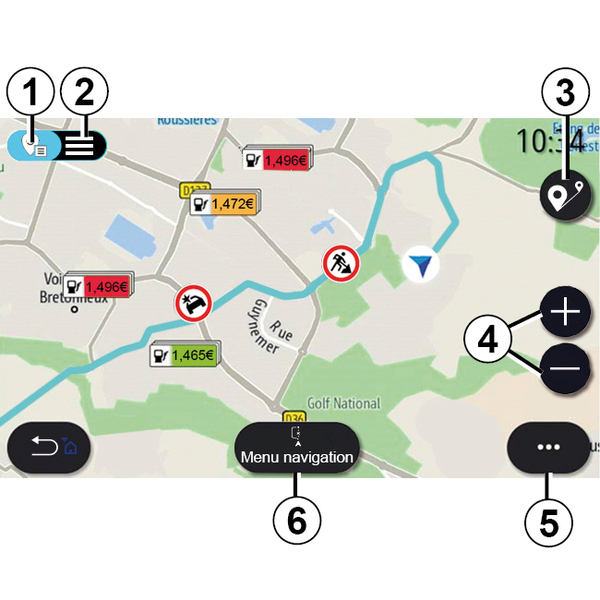
From the pop-up menu 5, you can access "Settings".
Note: the availability of "Traffic Map" services may vary.
warning
Precautions regarding navigation
Use of the navigation system does not in any way replace the responsibility or vigilance of the driver when driving the vehicle.
" Traffic Map " screen
You can view the traffic incident display on the map 1 or on the list of traffic incidents 2.
Press the zoom-in and zoom-out buttons 4 to adjust the map or slide two fingers together/apart on the screen to adjust the zoom distance.
While a route is in progress, press the icon 3 to recentre the route after having moved the map or adjusted the zoom level 4.
If a route is not in progress, press the icon 3 to return to the vehicle's position after having moved the map or adjusted the zoom 4.
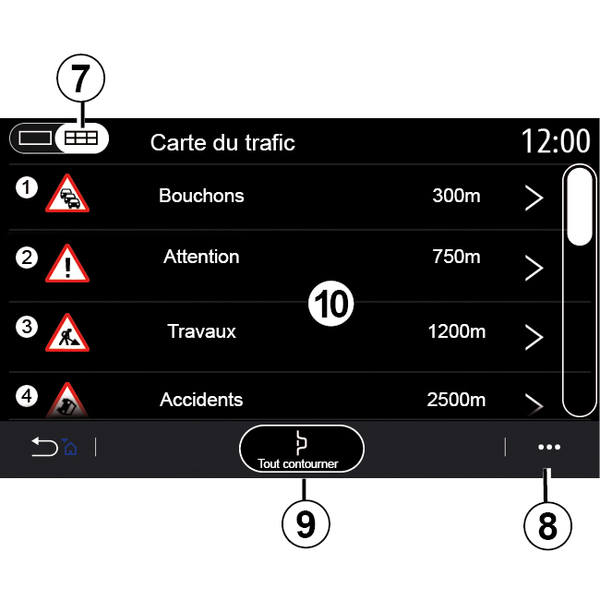
From the pop-up menu 8 you can access the various navigation settings: see the ""Navigation settings" section.
Use the "Avoid all" option 9 to avoid congested areas.
Traffic event list
From the traffic incident list 7 you can access the details of incidents along your route.
Select one of the incidents from the list 10 to display it in detail on the map.

Traffic incident details
Press on one of the items in the incident list to view the details and to display the relevant section of the route on the map A.
You can scroll through the traffic incidents using the arrows 12 and command the system to avoid a selected incident by pressing the button 11.

Traffic information bar
The Traffic Information bar on your route display 13 informs you of traffic incidents along the route in progress.
Press the Traffic Information bar 13 to display a detailed list of traffic incidents.