ALPINE PORTAL
Screen controls
Steering column control
Steering wheel control
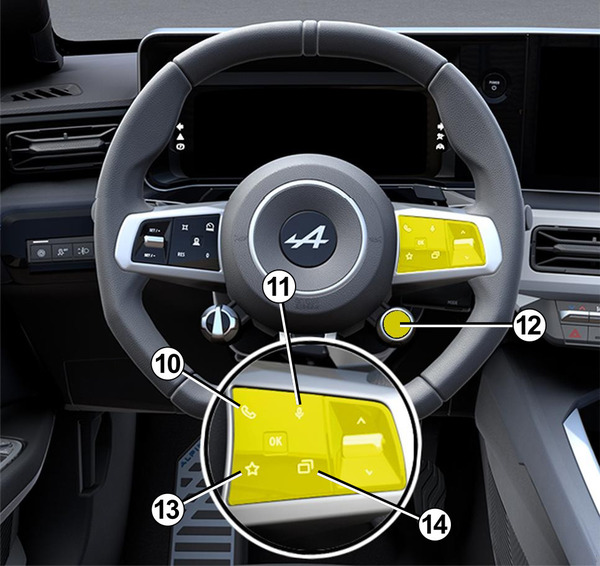
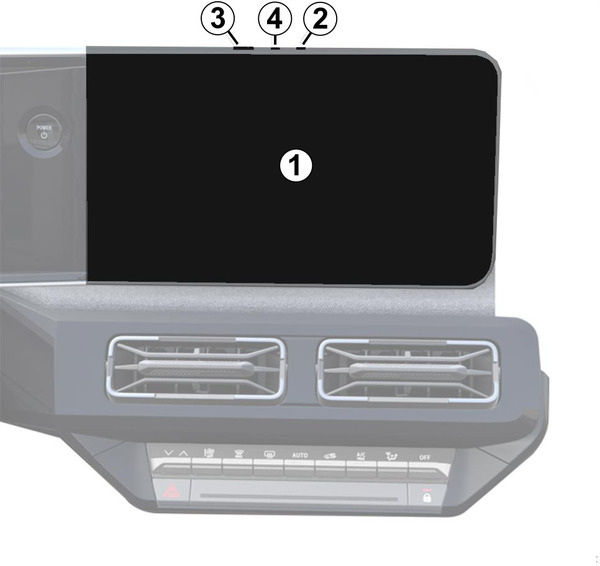
Functions
Function | |
|---|---|
1 | Multimedia screen. |
2 | Volume up. |
3 | Briefly press: "Radio - Music OFF"/"Radio - Music ON", "Minimal display", "Cleaning screen", "Stand-by". Press and hold (around five seconds): force the multimedia system to shut down. |
4 | Volume down. |
5 | Choose the audio source. |
6 | Browse the radio stations or audio tracks and directories (depending on the equipment). |
7 | Briefly press:
Press and hold (around 5 seconds):
|
8 | Briefly press:
Press and hold (around 5 seconds):
|
7 + 8 | Briefly press:
Press and hold (around 5 seconds):
|
9 | Change the playback mode for the radio stations ("List", "Favourites"). |
10 | If the telephone is not connected to the multimedia system:
If the telephone is connected to the multimedia system:
|
11 | Briefly press:
Press and hold:
|
12 | Briefly press:
Press and hold:
For further information, please refer to the "Drive Mode, DRIVE MODE" section. |
13 | Briefly press:
Press and hold:
For further information, please refer to the "User settings"User settings section. |
| 14 | Select the view displayed on the instrument panel among those available (e.g. navigation on the instrument panel). |
