ALPINE MULTIMEDIA SYSTEM
" Rear-view camera " menu
From the main menu, press "Settings" then the "Vehicle" tab and select "Parking assistance". Use this menu to configure the reversing camera.
For further information on the reversing camera, please see your vehicle user manual.
Note:
- make sure that the cameras are not obscured (by dirt, mud, snow, etc.);
- the reversing camera display is no longer available (it is replaced by a black screen) when the vehicle speed is above approximately 6 mph (10 km/h), depending on local legislation. A message appears on the screen to warn you that your speed is too high.
warning
For safety reasons, carry out these operations when the vehicle is stationary.

"Image settings"
You can adjust the following settings:
- brightness 3;
- contrast 2;
- colour 1.
"Guide lines"
You can activate or deactivate the moving guide lines 5 that indicate the vehicle trajectory according to the steering wheel position.
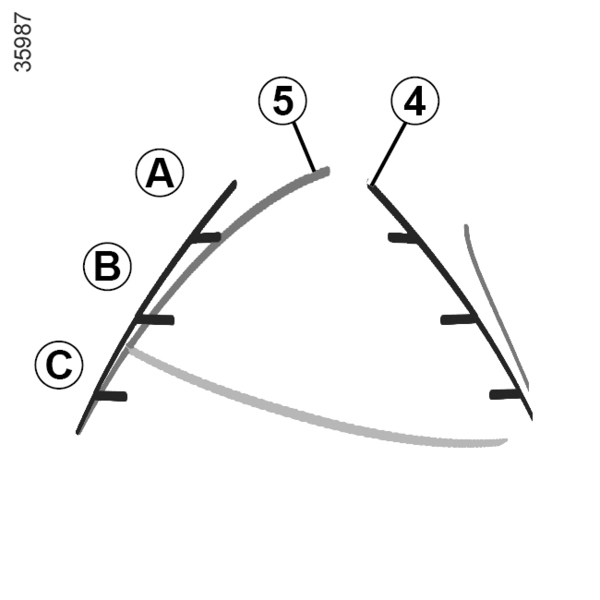
Fixed guide lines 4
The fixed guide line includes coloured markers A, B and C that indicate the distance behind the vehicle:
- A (blue) approximately 120 centimetres from the vehicle;
- B (white) approximately 60 centimetres from the vehicle;
- C (red) approximately 30 centimetres from the vehicle.
Moving guide line 5
(depending on the vehicle)
By default it is displayed in yellow on the multimedia screen. It indicates the vehicle trajectory according to the position of the steering wheel.