ALPINE MULTIMEDIA SYSTEM
" Video " menu
From the main menu, press "Applications" then the "Video" menu.
Select a connected input source.
If several sources are connected, select one of the input sources from the following list to access the videos:
- "USB1" (USB port);
- "USB2" (USB port).
Note:
- some formats may not be recognised by the system;
- the USB drive must be FAT32 or NTFS formatted and have a minimum capacity of 8 GB and a maximum capacity of 64 GB.
tip
Video playback is only possible when the vehicle is stationary. When driving, only the soundtrack of the current video remains active.
« Video »

When playing a video, you can:
- adjust the brightness by pressing the button 2;
- adjust the playback rate by pressing the button 3;
- access the pop-up menu 4;
- access the previous video by pressing 7 if the playtime does not exceed three seconds. After three seconds, the video resumes from the beginning;
- use the scroll bar 8;
- pause by pressing 6;
- access the next video by pressing 5;
- switch the video to full screen mode by clicking twice on the image preview area 1;
- return to the previous screen by pressing on 9.
Note:
- some functions are only available in full screen mode;
- the play controls disappear automatically after 10 seconds when playing a video in full screen mode.
Pop-up menu
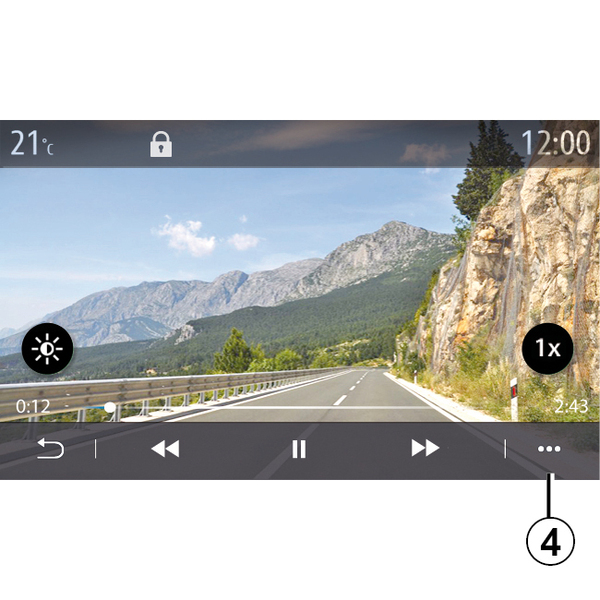
Using the pop-up menu 4, you can:
- get detailed information about the video (title, file type, date, filepath, etc.);
- Accessing settings
« Information »
From this menu, you can access information about the video (title, type, time, resolution).
Note: for more information on compatible video formats, please consult an approved dealer.
« Settings »
From the "Settings" menu, you can choose the display type:
- "Normal" (adjusted);
- "Full screen".
tip
Any new USB flash drive inserted is analysed and its image is stored in the multimedia system. Depending on the USB flash drive's capacity, the multimedia screen can be put on standby. Wait a few seconds. Only use USB flash drives that conform to the national requirements in force.