ALPINE PORTAL
"Driving assistance" menu
warning
These functions provide additional driving aids.
Therefore, under no circumstances can they replace the driver's vigilance and responsibility (the driver must always be ready to brake).
warning
For safety reasons, carry out any adjustments while the vehicle is stationary.
tip
Some driving aid services are only available by subscription and accessible during a defined time period. You can extend your subscription period via the website: www.my.alpinecars.fr
tip
Some settings have to be modified while the engine is on in order for them to be stored by the multimedia system.
Introduction
The vehicle is equipped with driving aids that offer additional assistance when driving your vehicle.
Please refer to the vehicle user manual for further information.
Note: some "Driving assistance" settings are available while the vehicle is stationary.
Access the "Driving assistance "


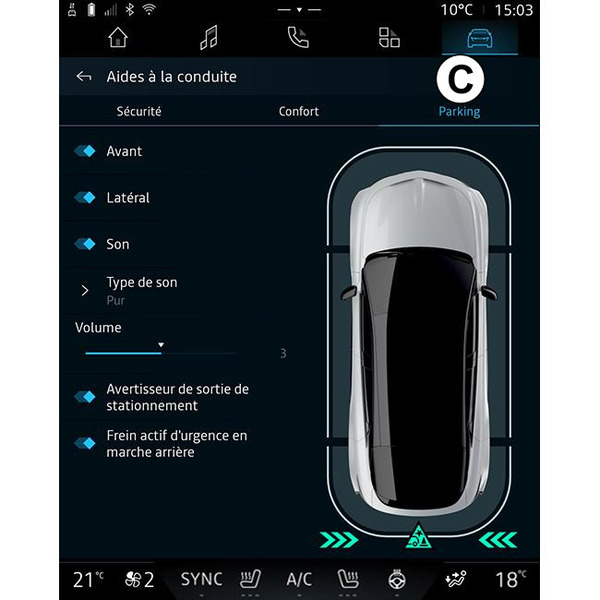
From the "Vehicle" world
 , select "Driving assistance" then the "Security" tab A for safety-related driving aids or the "Comfort" tab B for comfort-related driving aids.
The "Parking" tab C is intended for parking aids.
For more information on the "Parking" tab C, please refer to the section on "Parking aids") Parking aids.
« Security »
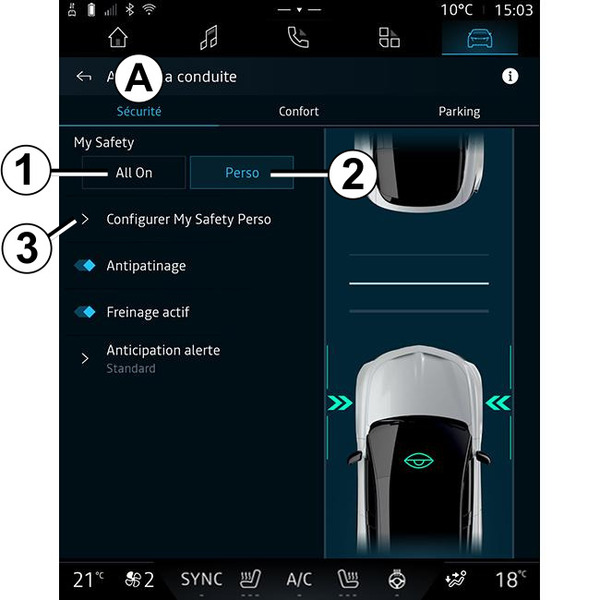
From the "Security" tab A, you can activate/deactivate and/or configure (depending on the equipment) the safety-related driving aids:
- " My Safety ";
- "All on" 1;
- « Perso » 2 ;
- « Traction control » ;
- « Active braking» ;
- « Warning anticipation » ;
- « Pedestrian detection » ;
- « Pedestrian alert sound » ;
- « Blind spot warning » ;
- ...
tip
The activate/deactivate button is highlighted when the function is activated.
« My Safety »
"All on" 1
The "My Safety" function can be used to deactivate or activate a set of driving aid functions simultaneously.
You can configure the "My Safety" function by modifying the set of driving aid functions that can be deactivated simultaneously from "Configure My Safety Perso" 3.
When "All on" My Safety is activated, the driving aids available in the mode are activated. This mode is activated by default each time the vehicle is started.
The "All on" function My Safety can also be activated by pressing once on your vehicle's
 control.
For more information on the
control, see the "My Safety" section in your vehicle user manual.
« Perso » 2
When My Safety "Perso" is activated, the safety aids that you have previously configured and customised from "Configure My Safety Perso" 3 are activated.
The My Safety "Perso" function can also be activated by pressing twice on your vehicle's
control.
For more information on the
control, see the "My Safety" section in your vehicle user manual.
« Configure My Safety Perso » 3

From this menu, you can activate and/or configure the driving aids (availability depends on the equipment) that you want to use when you activate My Safety "Perso" mode:
- « Overspeed audible warning » ;
- « Limitation change sound » ;
- « Lane departure prevention » ;
- "Operations on broken lines";
- « Departure anticipation » ;
- « Vibration » ;
- "Emergency lane departure prevention";
- « Blind spot warning » ;
- "Fatigue warning";
- "Distraction warning";
- "Emergency Stop Assist";
- ...
« Overspeed audible warning »
This function warns the driver with an audible alert when the vehicle exceeds the authorised speed limit.
« Limitation change sound »
This function warns the driver by an audible alert when the authorised speed limit changes.
« Lane departure prevention»
This function enables vibrations on the steering wheel (or by an audible warning, depending on equipment) to warn the driver if the vehicle strays out of lane and breaches a line (continuous or broken) without the direction indicators having been activated.
For further information, please refer to the "Lane Departure Warning" section in the vehicle user manual.
"Operations on broken lines"
This function corrects the vehicle's trajectory when it strays out of lane and crosses a broken line without the direction indicator lights having been activated if there is an imminent risk of impact (e.g. risk of hitting another vehicle when changing lanes without activating the direction indicator lights).
You can choose the desired vehicle system sensitivity, "Departure anticipation":
- « Early » ;
- « Standard » ;
- « Late ».
You can also choose the desired vibration intensity, "Vibration":
- « Low » ;
- « Standard » ;
- « High ».
"Emergency lane departure prevention"
This function warns the driver by vibrations on the steering wheel (or an audible alert, depending on equipment) when the vehicle strays out of lane and breaches line (continuous or discontinuous) without the direction indicator lights having been activated if there is a risk of impact (e.g. risk of hitting another vehicle when changing lanes without the direction indicator lights having been activated).
For further information, please refer to the "Lane Departure Warning" section in the vehicle user manual.
« Blind spot warning »
This function notifies the driver when another vehicle is in their blind spot.
For further information, please refer to the "Blind spot warning" section in the vehicle user manual.
"Fatigue warning"
This function analyses the behaviour of the driver's face using an interior camera and emits a warning if any risk of falling asleep is detected.
For further information, please refer to the "Additional driving aid functions" section in your vehicle user manual.
""Distraction warning"
This function analyses the behaviour of the driver's face using an interior camera and emits a warning if any distraction is detected.
For further information, please refer to the "Additional driving aid functions" section in your vehicle user manual.
"Emergency Stop Assist"
This feature helps to bring the vehicle to a standstill when the driver is no longer able to drive safely.
Once activated, the vehicle is kept in its lane and will slow safely to a complete stop in its own lane.
To activate this feature, you must enable at least one of the following two features:
- "Fatigue warning";
- "Distraction warning".
For further information, please refer to the "Emergency Stop Assist" section in the user manual for your vehicle.
« Traction control »
This function limits the wheelspin of the drive wheels and controls the vehicle when pulling away, accelerating or decelerating.
For further information, please refer to the "Driver correction devices and aids" section in your vehicle user manual.
« Active braking »
From this menu you can activate/deactivate the "Active braking" function. You can also choose the sensitivity of the warning trigger by pressing "Warning anticipation":
- « Early » ;
- « Standard » ;
- « Late ».
For more information, please see the "Advanced safety" section in your vehicle user manual.
« Pedestrian detection »
This function detects and warns the driver when there is a risk of collision with a pedestrian.
For further information, please refer to the "Safe passenger exit" section in your vehicle user manual.
« Pedestrian alert sound »
This feature warns the driver with an audible alert when there is a risk of collision with a pedestrian.
For further information, please refer to the "Safe passenger exit" section in your vehicle user manual.
« Comfort »
Using the "Comfort" tab B, you can activate/deactivate and/or configure the comfort-related driving aids:
- « Following distance » ;
- « Display risky areas » ;
- "Adaptive speed limiter" or "Adaptive speed limiter and cruise control *", depending on the equipment;
- « Contextual Adaptative Cruise Control * » ;
- "Incident and traffic predictive alerts*";
- ...
Note: the activate/deactivate button is highlighted when the function is activated.
« Following distance »
This function notifies the driver if they are too close to another vehicle.
For further information, please refer to the "Safe distance alert" section in your vehicle user manual.
« Display risky areas »
This function enables the display of risky areas.
For more information, please refer to the "Stop and GoAdaptive cruise control" and "Road sign detection" sections in the vehicle's Driver's Handbook.
"Adaptive speed limiter" or "Adaptive speed limiter and cruise control *"
(depending on equipment)
This function allows you to limit and regulate the speed of your vehicle according to the road.
For more information, please refer to the "Stop and GoAdaptive cruise control" and "Road sign detection" sections in the vehicle's Driver's Handbook.
« Contextual Adaptative Cruise Control * »
This function allows you to regulate the speed of your vehicle according to the road layout (e.g. roundabout, bend, etc.).
For more information, please refer to the "Stop and Go Adaptive cruise control" section in your vehicle user manual.
"Incident and traffic predictive alerts*"
(depending on equipment and country)
This function warns you of dangers detected on your route (e.g. heavy traffic, roadworks, accidents, stopped vehicles, etc.) using real-time traffic information from other road users or monitoring systems. For more information, please refer to the "Adaptive cruise control" section in the user manual for your vehicle.
You must first authorise data sharing. From your " Profile ", which is available in the notification centre, press " Privacy settings ", then select:
- « Accept all » ;
or
- " Customise ", then activate " A unique driving experience ".
For further information, please refer to the "Activating services" section Activating services.
Note: when you want to use the "Incident and traffic predictive alerts*", make sure you are located in an area with network coverage and that you have good reception GPS.