A290
General information
Depending on the country and subscription, you can install a digital key for your vehicle on your smartphone.
The digital key contains the rights required to lock/unlock and start your vehicle using a smartphone. Thus, your smartphone replaces your card.
The installation, administration and transmission of the digital keys are carried out using the manufacturer's app.
Once the manufacturer's application is installed on your smartphone and the subscription is activated, the digital key must be activated from the manufacturer's application.
tip
If you need to entrust your vehicle to somebody else, make sure you have the vehicle card with you to guarantee access to the vehicle (e.g. in the context of an intervention on the vehicle, an appointment with an approved dealer or a qualified professional, etc.).
tip
Secure access to the digital key on the smartphone
It is the responsibility of the owner of the digital key and the designated users to protect and secure access to the digital key on the smartphone.
Make sure that you install the necessary security and protection tools on your smartphone (such as securing the screen with a password).
Operating conditions
Activate Bluetooth® on your smartphone then open the manufacturer's application to access the various digital key functions.
Note: the smartphone must be sufficiently charged in order to use a digital key. In the event of a low charge level, the "Low smartphone battery" message appears on the instrument panel.
tip
In the event of vehicle lending, the owner of the digital key is responsible for designating a trusted person as another user of the vehicle.
Lending a digital key
From the manufacturer's app, access the "Share Virtual Key " menu and fill in the information for the occasional user. After validation, a confirmation email will be sent to the user.
tip
The digital key's operational reach will depend on your smartphone's Bluetooth® connection.
To avoid any error in the transmission of a digital key to an occasional user (for example: lack of WIFI or mobile network, etc.), be sure to anticipate the lending procedure.
To do this, make sure that:
- the manufacturer's application has previously been downloaded and installed by the occasional user;
- your smartphone and the occasional user's smartphone are connected to the internet throughout the procedure (via WIFI or mobile networks);
- the occasional user's digital key is activated once the procedure is completed.
Revoking a digital key
The user can individually revoke a digital key. Once a digital key has been revoked, the user can activate a new key.
For more information, please see the manufacturer's application.
Activation/deactivation from the multimedia screen
It is possible to deactivate and reactivate the "Digital key" function so that the vehicle does not communicate with any digital key. Refer to the multimedia instructions.
Note: deactivating the function will not delete existing digital keys. It only deactivates the vehicle's capacity to communicate with them.
Locking/unlocking the doors and luggage compartment, deadlocking, remote lighting
The first time the vehicle is unlocked or started using a new digital key or a new smartphone, it will take several seconds for the vehicle to identify the digital key installed on your smartphone.
From your smartphone, with Bluetooth® activated, open the manufacturer's application and discover the various functions available for your digital key. They are identical to those of your card.
Special features related to unlocking the opening elements
Under certain circumstances (e.g. after eight days of the vehicle not being used), it is not possible to unlock the vehicle using a digital key: press the luggage compartment opening button then unlock your vehicle using your digital key.
These functions are:
- locking/unlocking all the opening elements Use;
- locking/unlocking the luggage compartment (depending on the vehicle) Use;
- deadlocking (depending on the vehicle) Deadlocking;
- activating the lighting remotely Card;
- remote sounding of the horn (allows you to identify the vehicle from afar or when parked in a crowded car park, for example);
- starting/stopping the engine Starting, stopping the engine.
Starting, stopping the engine

Upon first use and each time a new smartphone is used, it is necessary to calibrate your digital key with your vehicle.
To do this, activate Bluetooth® on your smartphone then follow the procedure from the manufacturer's application.
When calibrating, the smartphone must be placed in the placement area 1.
To start/stop the engine, the system checks that the smartphone is present in the placement area 1 before allowing the engine to be started.
For more information, please refer to the information on "Starting, stopping the engine" Starting, stopping the engine.
The smartphone must remain in the vehicle throughout the journey.
Note: if a digital key is being lent, you can delete it by carrying out the revoking procedure using the smartphone while it is placed in the placement area 1.
Otherwise, the deletion request is left pending and is only confirmed once the engine is started using another digital key or a card.
tip
It is necessary to place the smartphone in the placement area in order to start and stop the engine and when calibrating.
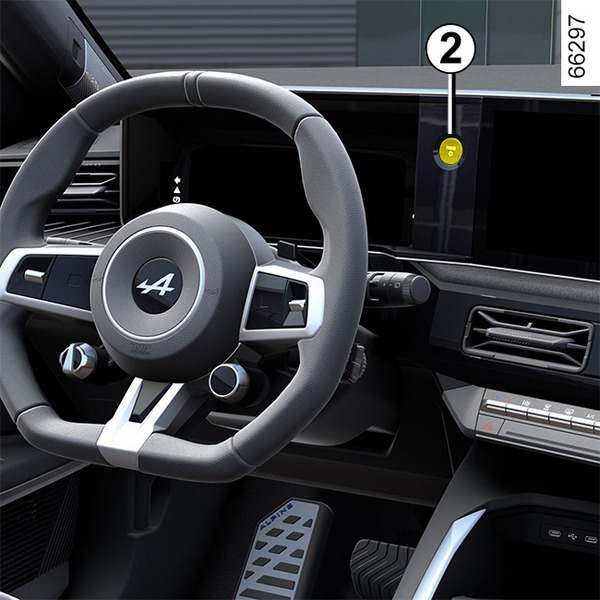
If the smartphone is no longer in the passenger compartment when you try to switch the engine off, a message is displayed on the instrument panel: press and hold the engine start/stop button 2 for more than two seconds.
If the smartphone is no longer in the passenger compartment, make sure you can retrieve it before pressing and holding. Without a smartphone or card, you will not be able to start the vehicle again.
Special features of the digital key
For the digital key to remain active, the smartphone concerned must be connected to the Internet (via WIFI or mobile network) at least once every 48 hours. Otherwise, connect your smartphone to the internet for a few minutes so that the digital key can be reactivated.
- If a card has been left inside the vehicle and the doors have been locked with the digital key, it will not be possible to start the vehicle using the card. It will be impossible to start the vehicle using the card until the next engine restart.
In this case, the next time you want to start the engine you will need to use either the digital key or a card other than that left inside the vehicle.
tip
When the engine is started or stopped, the smartphone should always be sufficiently charged in order to use the digital key.