A110
Exterior lighting and signals

Side lights
-

- Turn the ring 2 on the stalk 1 until the symbol appears opposite the mark 3. This indicator light on the instrument panel comes on.
Daytime running lights function
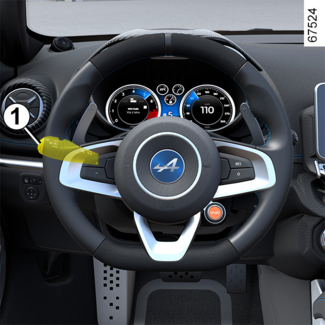
Rotate the ring 2 on the stalk 1 until the AUTO symbol is aligned with the mark 3.
Note: in the AUTO position, the daytime running lights come on automatically when the engine is started
and switch off when the engine is stopped.
WARNING
Before driving at night, check that the electrical equipment is operating correctly
and adjust the headlight beams (if your vehicle is not carrying its normal load).
As a general precaution, check that the lights are not obscured (by dirt, mud, snow
or objects being transported).
Dipped beam headlights
-

- Manual operation
Turn the ring 2 until the symbol is opposite the mark 3. This indicator light on the instrument panel comes on.
Automatic operation
Turn the ring 2 until the AUTO symbol is opposite the mark 3: with the engine on, the dipped beam headlights switch on or off automatically according
to the exterior light level, without any action on the stalk 1.
Main beam headlights
-

- With the engine running and the dipped beam headlights lit, push stalk 1. This indicator light on the instrument panel comes on.
To return to the dipped headlight position, pull the stalk 1 towards you again.
Switching off the lights
Rotate the ring 2 until the AUTO symbol is aligned with the mark 3. If the main beam headlights are not illuminated, the lights switch off once the
engine stops, the driver's door is opened or the vehicle is locked.
Lights-on reminder audible alarm
A warning beep sounds when the driver's door is opened to warn you that the lights
are still on.
Welcome and goodbye function
(depending on the vehicle)
Once the function is activated, the side lights come on automatically when the Renault
card is detected or when the vehicle is unlocked.
They switch off automatically:
- approximately one minute after lighting up;
- when starting the engine, based on the position of the lighting stalk;
or
- upon locking the vehicle.
Rear fog lights
-

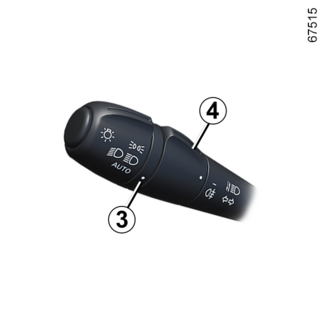
- Turn centre ring 4 on the stalk until the symbol faces mark 3, then release it.
Operation of the fog lights depends on the exterior lighting selected, and an indicator
light will light up on the instrument panel.
Do not forget to switch off the fog lights when they are no longer needed, to avoid
inconveniencing other road users.
Switching off the lights
Rotate the ring 4 again to align the mark 3 with the symbol corresponding to the rear fog lights. The warning light on the instrument
panel goes out.
The rear fog lights switch off when the exterior lights are switched off.
Tip
When driving in fog or snow, or when transporting objects which are higher than the
roof, the headlights do not come on automatically.
The fog lights are controlled by the driver: the indicator light on the instrument
panel informs you whether they are on (indicator light on) or off (indicator light
off).