A110
"Hands-free" card: battery
Replacing the battery
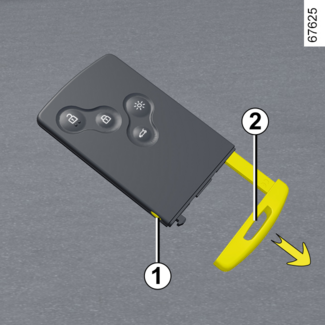
When the "Keycard Battery Low" message appears on the instrument panel, replace the card battery: press button
1 while pulling the emergency key 2 then unclip the cover 3 using the tab 4.
Remove the battery by pressing on one side (movement A) and by lifting the other (movement B) then replace it, observing the polarity and model indicated on the cover 3.
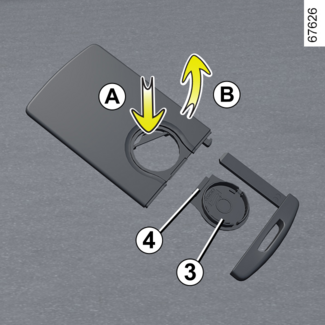
To refit, proceed in the reverse order then press one of the buttons on the card four
times while you are near the vehicle: the next time the vehicle is started, the message
will disappear.
Check that the cover is clipped shut.
Note: when replacing the battery, do not touch the electronic circuit or contacts on the
card.
Tip
The batteries are available from approved Dealers, and their service life approximately
two years. Check that there is no dye on the battery: risk of an incorrect electrical
contact.
WARNING
If they need to be replaced, be sure to use the same or equivalent type of battery
(consult an Approved Dealer).
WARNING
When replacing:
- make sure that the batteries are correctly inserted.
There is a risk of explosion.
- if the flap does not close correctly, do not use and keep out of reach of children.
Operating faults
If the battery is too flat to operate, you can still start the vehicle (insert the
card into the card reader) and lock/unlock the vehicle (refer to the information on
"Locking and unlocking the doors" in Section 1).
Tip
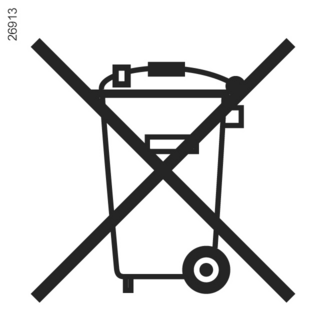
Do not throw away your used batteries; give them to an organisation responsible for
collecting and recycling batteries.
WARNING
Precautions relating to batteries:
- keep batteries (new or used) out of reach of children;
- not to swallow the batteries.
Risk of chemical burns which may lead to death.
- if ingested or inserted into any part of the body, consult a doctor as soon as possible.