A110
Card
General information
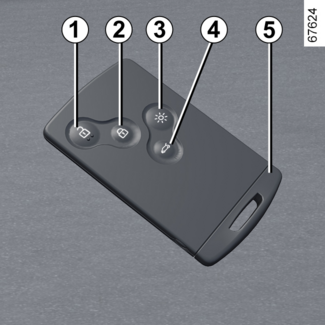
The card is stored in a case.
- 1.
- Unlocking the doors and luggage compartment.
- 2.
- Locks all the opening elements.
- 3.
- Switching on the lighting remotely.
- 4.
- Locking/unlocking the rear luggage compartment.
- 5.
- Integrated key.
The card is used for:
- locking/unlocking the opening elements (doors and luggage compartment) and the fuel filler flap (refer to the following pages);
- switch on the vehicle lighting remotely (refer to the following pages);
- starting the engine (refer to the information on "Starting the engine" in Section 2).
Range
Make sure that the correct battery type is being used, and that the battery is in
good condition and inserted correctly. Its service life is approximately two years:
replace it when the "Keycard Battery Low" message appears on the instrument panel (refer to "Card: battery" in Section 5).
Tip
When the battery is flat, you can still lock/unlock and start your vehicle. Refer
to the information on "Locking/unlocking the doors" in Section 1 and "Starting the
engine" in Section 2.
card operating range
This varies according to the surroundings. It is important to make sure when handling
the card that you do not lock or unlock the doors by inadvertently pressing the buttons.
Tip
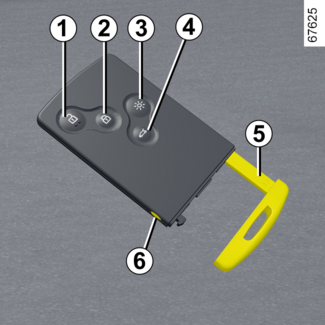
When storing the card in its case, turn it so that buttons 1, 2, 3 and 4 can be positioned opposite the markings on the case.
Integrated key 5
The built-in key is used to lock or unlock the front left-hand door if the card is
not working:
- when the card battery is drained, flat battery, etc.
- when devices using the same frequency as the card are in use;
- the vehicle is located in a high electromagnetic radiation zone.
Access to key 5
Remove the card from its case. Press button 6 and pull the key 5 then release the button.
Using the key
Please refer to the information on "Locking, unlocking the opening elements".
Once you have entered the vehicle using the integrated key, put it back in its casing
in the card.
Store the card in its case.
WARNING
Driver's responsibility when parking or stopping the vehicle
Never leave an animal, child or adult who is not self-sufficient alone in your vehicle,
even for a short time.
They may pose a risk to themselves or to others by starting the engine, activating
equipment such as the electric windows or by locking the doors.
Also, in hot and/or sunny weather, please remember that the temperature inside the
passenger compartment increases very quickly.
RISK OF DEATH OR SERIOUS INJURY.
Tip
Recommendations
Avoid leaving the card in hot, cold or humid areas.
Do not keep the cardin a place where it could be bent or damaged accidentally, such as in a back pocket
of a garment where it might be sat on.
Tip
Replacement: need for an additional card
If you lose your card or require another, you can obtain one from an approved dealer.
If a card is replaced, it will be necessary to take the vehicle and all its cards to an approved Dealer to initialise the system.
You may use up to four cards per vehicle.
WARNING
Driver's responsibility when parking or stopping the vehicle
Never leave an animal, child or adult who is not self-sufficient alone in your vehicle,
even for a short time.
They may pose a risk to themselves or to others by starting the engine, activating
equipment such as the electric windows or by locking the doors.
Also, in hot and/or sunny weather, please remember that the temperature inside the
passenger compartment increases very quickly.
RISK OF DEATH OR SERIOUS INJURY.
Use
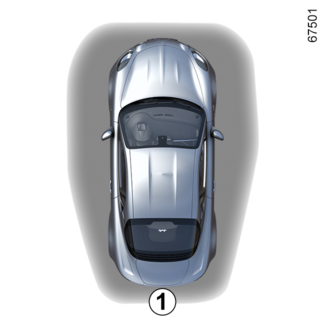
There are two ways to lock/unlock the vehicle:
- the card in "hands-free" mode;
- the card in remote control mode.
Tip
Do not store the card anywhere it may come into contact with other electronic equipment
(computer, phone etc.) as this could hinder its operation.
Using the card in hands-free mode
Unlocking the vehicle
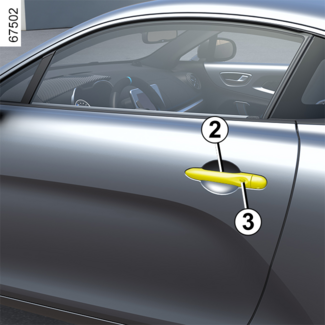
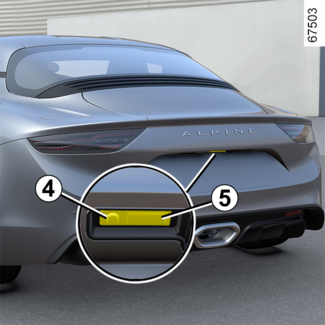
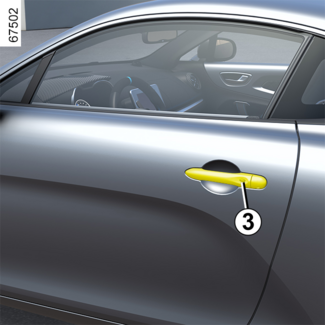
With the card in zone 1 and the vehicle locked, press button 3 on the handle 2 of one of the front doors: the vehicle is unlocked.
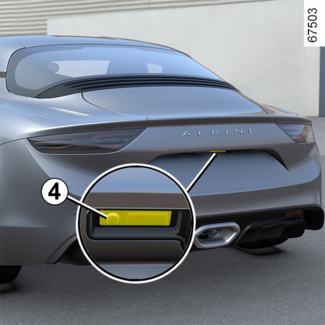
Press button 4 or button 5 to open the luggage compartment and unlock the other opening elements.
Unlocking is indicated by one flash of the hazard warning lights and the indicator lights.
Note: the vehicle cannot be locked again for three seconds after unlocking by pressing
button 3 as the locking is inhibited.
Tip
After locking/unlocking the vehicle using the buttons on the card, "hands-free" locking
and unlocking is deactivated.
To reactivate the "hands-free" mode, restart the vehicle.
Interference
Interference by factors in the immediate vicinity (external installations or the use
of equipment operating on the same frequency as the card) may disrupt its operation.
Special features of the unlocking system
After three days of inactivity, unlocking by pressing button 3 or button 4 is deactivated. Press the remote control to unlock the vehicle and to reactivate
the mode.
Locking the vehicle
With the card in zone 1 and the doors and luggage compartment closed, press button 3 on one of the front door handles or button 4 on the luggage compartment door. The vehicle will lock. The indicator lights and
hazard warning lights flash twice to indicate that the doors have locked.
Special features of the locking system
After locking by pressing button 3 or button 4, you must wait for approximately three seconds to be able to unlock the vehicle again.
During these three seconds, the door handles can be tried to make sure that the vehicle
is locked properly.
If an opening element (door, luggage compartment or bonnet) is open or incorrectly
closed, when locking by pressing button 3 or button 4, the vehicle will lock and then quickly unlock without flashing of the hazard warning lights and direction indicator lights.
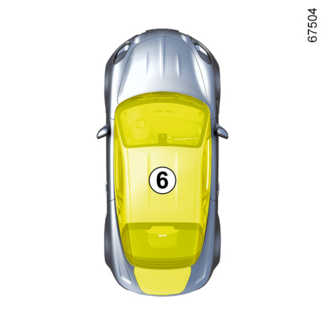
The vehicle cannot be locked if the card is within zone 6.
"Hands-free" card non-detection alarm
With the engine on, if you open and close a door and the card is no longer in zone 6, the "Keycard Not Detected" message is displayed on the instrument panel for approximately 15 seconds and a
beep sounds to warn you.
The warning disappears when the card is again in zone 6.
Using the card as a remote control
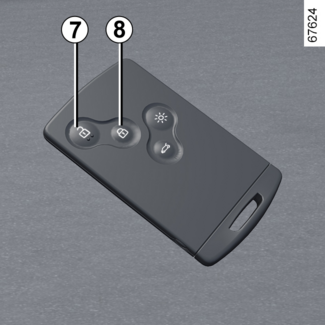
Unlocking with the card
Press the button 7.
Unlocking is indicated by one flash of the hazard warning lights and the indicator lights.
Tip
The card buttons are deactivated when the engine is running.
Locking using the card
With the doors, luggage compartment and bonnet closed, press button 8: the vehicle locks.
The indicator lights and hazard warning lights flash twice to indicate that the doors have locked.
Note: the maximum distance from which the vehicle can be locked depends on the surroundings.
WARNING
Never leave your vehicle with the card inside.
Tip
Recommendations
To prevent premature discharging of the vehicle battery during standby, maintain the
card at least five metres from your vehicle.
WARNING
Driver's responsibility when parking or stopping the vehicle
Never leave an animal, child or adult who is not self-sufficient alone in your vehicle,
even for a short time.
They may pose a risk to themselves or to others by starting the engine, activating
equipment such as the electric windows or by locking the doors.
Also, in hot and/or sunny weather, please remember that the temperature inside the
passenger compartment increases very quickly.
RISK OF DEATH OR SERIOUS INJURY.
Deadlocking
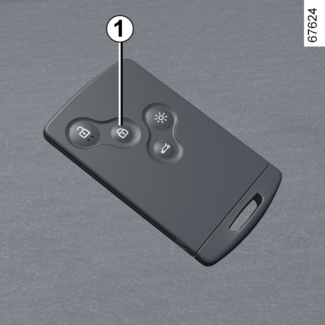
If the vehicle is equipped with a deadlocking function, this allows you to lock the
opening elements and to prevent the doors from being unlocked using the interior handles
(for example, by breaking the window and then trying to open the door from the inside).
WARNING
Never use deadlocking if someone is still inside the vehicle.
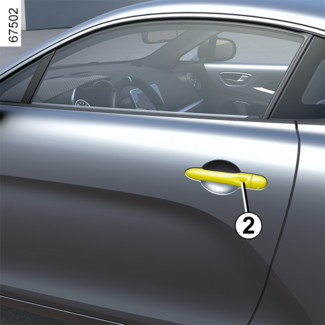
Vehicle with card
Press button 1 twice in quick succession.
Vehicle with "hands-free" card
With the vehicle unlocked, you can also press twice, in quick succession, on button
2 of the driver's door and passenger's door or on button 3 of the luggage compartment.
In both cases, the hazard warning lights and direction indicator lights give two slow flashes and three quick flashes to indicate locking.
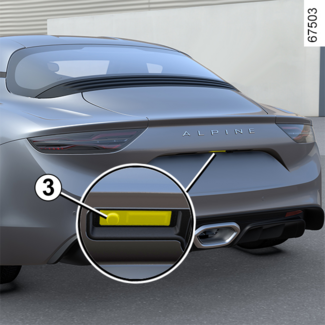
Special note: deadlocking is not possible if the hazard warning lights or the side lights are lit.