A110
Starting with "hands-free" card
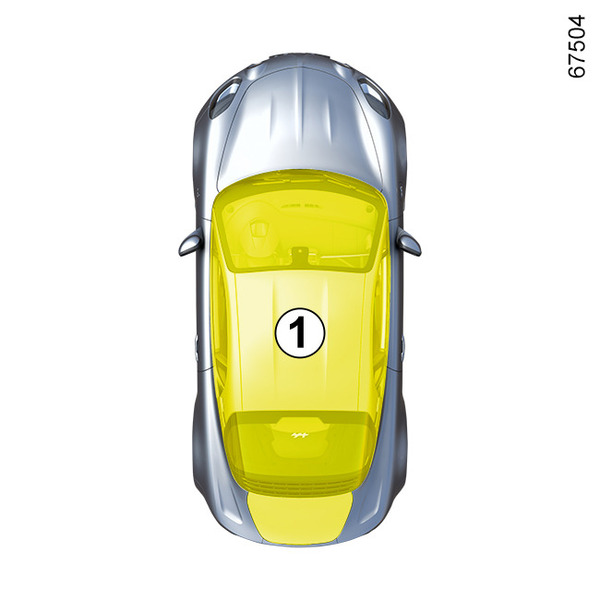
The card must be in the detection zone 1.
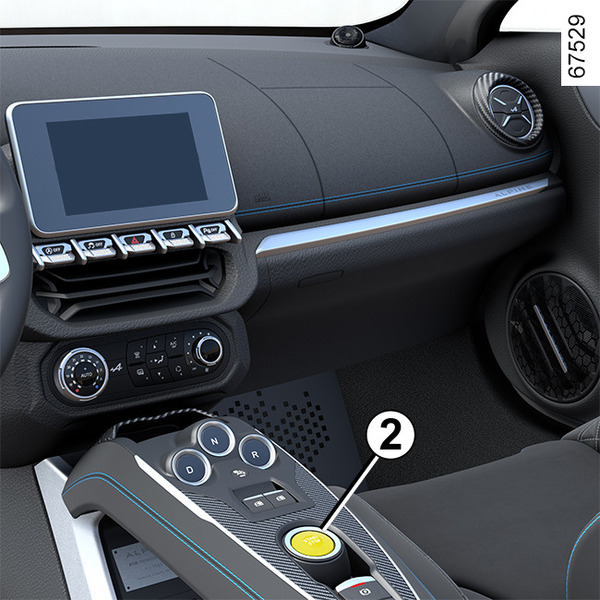
With the gearbox in P or N position (refer to "Automatic gearbox" in Section 2) and your foot on the brake pedal, press the button 2 to start the engine.
"Hands-free" starting with the luggage compartment open
In this case, the card should not be located in the luggage compartment, to prevent the risk of loss.
warning
Driver's responsibility when parking or stopping the vehicle
Never leave an animal, child or adult who is not self-sufficient alone in your vehicle, even for a short time.
They may pose a risk to themselves or to others by starting the engine, activating equipment such as the electric windows or locking the doors.
Also, in hot and/or sunny weather, please remember that the temperature inside the passenger compartment increases very quickly.
RISK OF DEATH OR SERIOUS INJURY.
Starting the vehicle using the remote control card
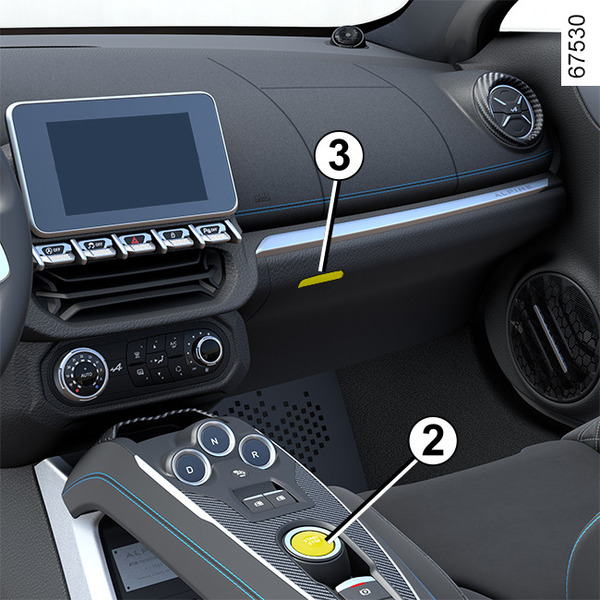
When you get into the vehicle, insert the card's built-in key, pointing towards you, fully into the card reader 3.
With the gearbox in P or N position (refer to "Automatic gearbox" in Section 2) and your foot on the brake pedal, press the button 2 to start the engine.
Special features
- If one of the conditions required for starting is not met, the "Press brake + start" or "Select P" message is displayed on the instrument panel;
- in some cases, it will be necessary to move the steering wheel whilst pressing the start button 2 to help unlock the steering column: in this case the "Turn Steering Wheel + START" message will warn you.
Accessories function
(switching on the ignition)
Once you have gained access to your vehicle, you may use some of its functions (radio, navigation, wipers, etc.).
For other functions:
- vehicles equipped with a "hands-free" card: with the card in the passenger compartment, press the button 2 without pressing the pedals;
- vehicles equipped with a remote control card: insert the card into the reader 3.
tip
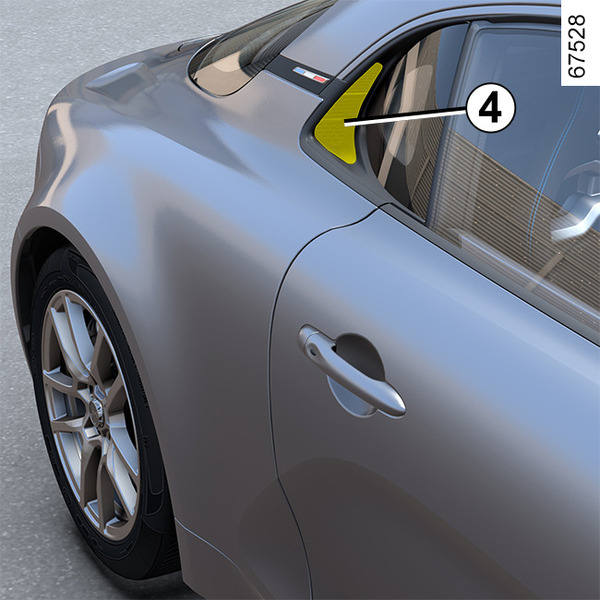
Before starting, ensure that nothing will obstruct the air vents 4.
Operating faults
In certain cases, the hands-free card may not work:
- when the card battery is drained, flat battery, etc.
- near to appliances operating on the same frequency as the card (monitor, mobile phone, video game device, etc.);
- the vehicle is located in a high electromagnetic radiation zone.
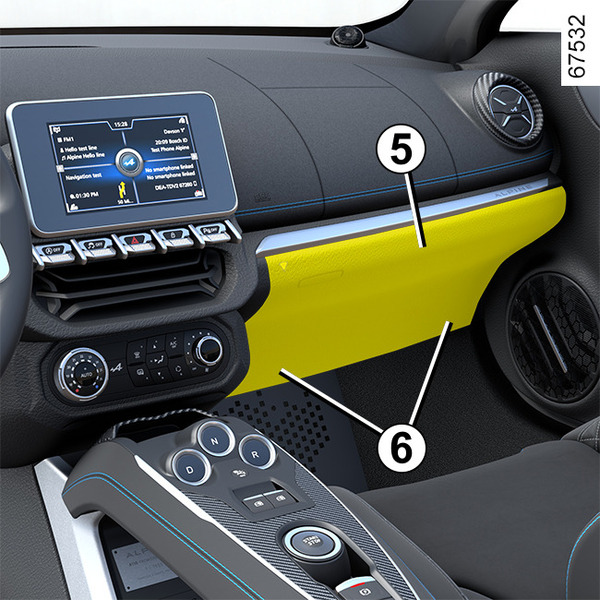
The "Insert keycard" message appears on the instrument panel.
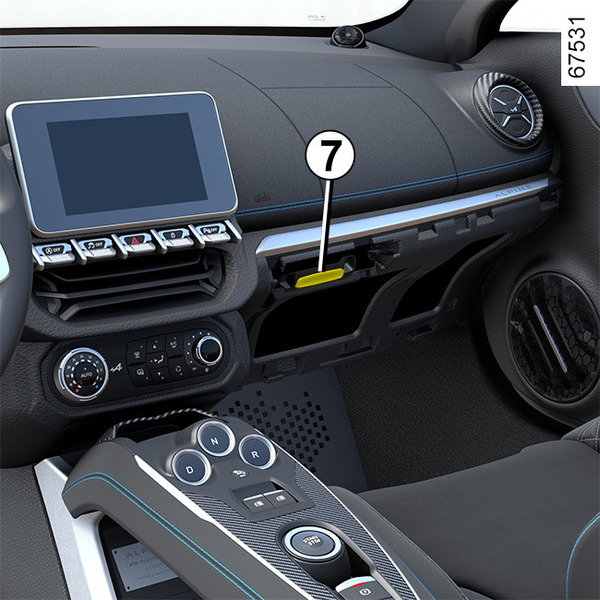
Pull the cover 5 by the flaps 6 to unclip it.
Insert the card fully into the card reader 7.
Conditions for stopping the engine
The vehicle must be stationary and the gearbox in position P or N (refer to "Automatic gearbox" in Section 2).
Special feature
Depending on the vehicle, accessories (e.g. radio) stop working either when the engine is switched off or when the driver's door is opened or when the doors are locked.
warning
Never switch off the ignition before the vehicle has stopped completely. Once the engine has stopped, the brake servo, power-assisted steering, etc., and the passive safety devices such as the airbags and pretensioners will no longer operate.
"Hands-free" card
With the card in the vehicle, press the button 2: the engine is switched off. The steering column is locked when the driver's door is opened or the vehicle is locked.
warning
When you leave your vehicle, especially if you have your card with you, check that the engine is completely switched off.
warning
Driver's responsibility when parking or stopping the vehicle
Never leave an animal, child or adult who is not self-sufficient alone in your vehicle, even for a short time.
They may pose a risk to themselves or to others by starting the engine, activating equipment such as the electric windows or locking the doors.
Also, in hot and/or sunny weather, please remember that the temperature inside the passenger compartment increases very quickly.
RISK OF DEATH OR SERIOUS INJURY.
Remote control card
With the card in the reader 3, press the button 2: the engine stops. Removing the card from the reader locks the steering column.
Special feature
If the card is no longer in the passenger compartment or if the card's battery is flat, when the vehicle is stationary and you try to switch the engine off, the "Keycard absent : press/hold START" message appears on the instrument panel: press the button 2 for at least three seconds.
Stop and Start function
This system enables a reduced fuel consumption and lower greenhouse gas emissions.
The system is activated automatically when the vehicle is started. While driving, the system stops the engine (standby) when the vehicle is at a standstill (traffic jam, traffic lights, etc).
Conditions for engine standby
- The vehicle has been driven since its last stop;
and
- the gearbox is in D, Mor N position (refer to "Automatic gearbox" in Section 2);
and
- the brake pedal is pressed (sufficiently hard);
and
- and the accelerator pedal is not pressed;
and
- the speed is zero for around 1 second.
The engine is kept on standby if P position (refer to the information on the "Automatic gearbox" in Section 2) is engaged or if N position is engaged and the parking brake is applied while the brake pedal is released.
The warning light
 on the instrument panel is lit when the engine is on standby.
The vehicle equipment remains operational while the engine is stopped.
warning
If the engine is put in standby, the electronic parking brake is not applied automatically.
warning
Keep your vehicle stationary when the engine is on standby (shown by the warning light
on the instrument panel).
warning
Before leaving the vehicle, the engine must be stopped and not just on standby (please see the information on "Starting, stopping the engine" in Section 2).
Preventing the engine from standing by
In certain situations, such as negotiating a crossroads for instance, it is possible (with the system activated) to keep the engine on so as to be ready to move off quickly.
Keep the vehicle stationary without pressing too hard on the brake pedal.
Conditions for coming out of engine standby
- The brake pedal is released and D or M position is engaged;
or
- the brake pedal is released, N position is engaged and the parking brake is released;
or
- the brake pedal is pressed again, P position is engaged or N position is engaged and the parking brake is applied;
or
- the R position is engaged;
or
- the accelerator pedal is depressed.
Special note: depending on the vehicle, if you switch off the ignition when the engine is on standby, the
 warning light may be displayed for a few seconds on the instrument panel.
warning
The engine must be switched off for refuelling (and not just on standby for vehicles equipped with the Stop and Start function): you must switch off the engine completely (please refer to the information on "Starting and stopping the engine" in Section 2).
Fire hazard.
Conditions preventing the standby of the engine
Certain conditions prevent the system from using the engine standby function, especially when:
- reverse gear is engaged;
- the driver's door is not closed;
- the driver's seat belt is not fastened;
- the outdoor temperature is too low or too high;
- the battery is not sufficiently charged;
- the difference between the vehicle interior temperature and the automatic climate control setpoint is too high;
- the Sport or Track driving mode is activated (please refer to "Choice of driving mode" in Section 2);
- the altitude is too high;
- the gradient is too steep;
- the "Clear View" function is activated (refer to "Automatic climate control" in Section 3);
- the engine temperature is too low;
- ...
Warning light
 is displayed on the instrument panel. This notifies you that engine standby is not available.
warning
Before carrying out any operation in the engine compartment, the ignition must be switched off (refer to the information on "Starting, stopping the engine" in Section 2)
Special cases
With the engine on standby (traffic jam, traffic lights, etc.), if the driver unfastens their seat belt, opens the driver's door or gets out of their seat, the ignition will be switched off.
The handbrake is applied automatically.
To restart and reactivate the Stop and Start system, start the engine (refer to the information on "Starting, stopping the engine" in Section 2).
Special feature of the automatic engine re-start
Under certain conditions, the engine can restart on its own in order to guarantee your safety and comfort.
This may occur when:
- the outdoor temperature is too low or too high;
- the "Clear View" function is activated (refer to "Automatic climate control" in Section 3);
- the battery is not sufficiently charged;
- the vehicle speed is above 3 mph (5 km/h) (downhill slope, etc.);
- the brake pedal is pressed repeatedly or there is a braking system requirement;
- ...
Deactivating, activating the function
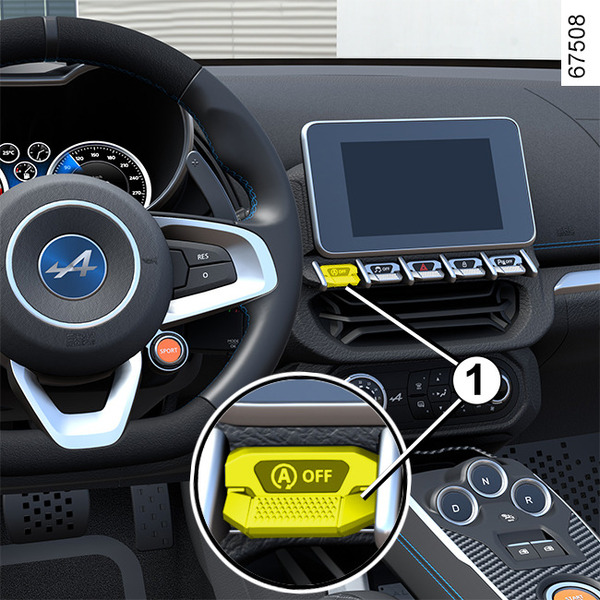
Press the switch 1 to deactivate the function. The "Stop & Start deactivated" message appears on the instrument panel and the switch 1 indicator light illuminates.
Pressing again will reactivate the system. The "Stop & Start activated" message appears on the instrument panel and the switch 1 indicator light goes out.
tip
Special note: with the engine on standby, press switch 1 to automatically restart the engine.
The system reactivates automatically each time the vehicle is started using the start button (refer to "Starting, stopping the engine" in Section 2).
Operating faults
If the "Check Stop & Start" message appears on the instrument panel accompanied by the warning light 1, this indicates that the system is deactivated.
Consult an approved dealer.
warning
Before leaving the vehicle, the engine must be stopped and not just on standby (please see the information on "Starting, stopping the engine" in Section 2).