ALPINE PORTAL
Induction charging area
tip
It is essential not to leave any objects (USBdrive, SD card, starting card, credit card, jewellery, keys, coins, etc.) in the induction charging zone 1 when charging your phone. Remove any magnetic cards or credit cards from the phone case before positioning your telephone in the induction charging area 1.
tip
Objects left in the induction charging area 1 may overheat. It is advisable to place them in the other storage areas provided. (storage compartment, sun visor storage compartment, etc.)

The induction charging area 1 can be used to charge a telephone without a cable.
The charging area is identified by:
- an associated symbol;
and/or
- the charging status is automatically displayed on the screen as long as the phone is positioned in the dedicated area.
Its location may vary depending on the vehicle. Please refer to the vehicle user manual for further information.
Note:
- the induction charging is initiated when the ignition is switched on or when the engine is on;
- make sure that your phone is compatible with induction charging;
- to enable optimal charging, it is preferable to remove the protective case from your phone before charging;
- for optimal charging, the entire surface of the smartphone should coincide with a maximum of the surface of the charging area and be positioned the most central possible.
Charging procedure
Place your phone in the induction charging zone 1. Charging is automatically started and the charging progress 2 is displayed on the screen.
The charging procedure may be interrupted if an object is detected in the induction charging area 1 or if the induction charging area 1 is overheating. Once the temperature has dropped, your phone will soon start to charge again.
Charging progress
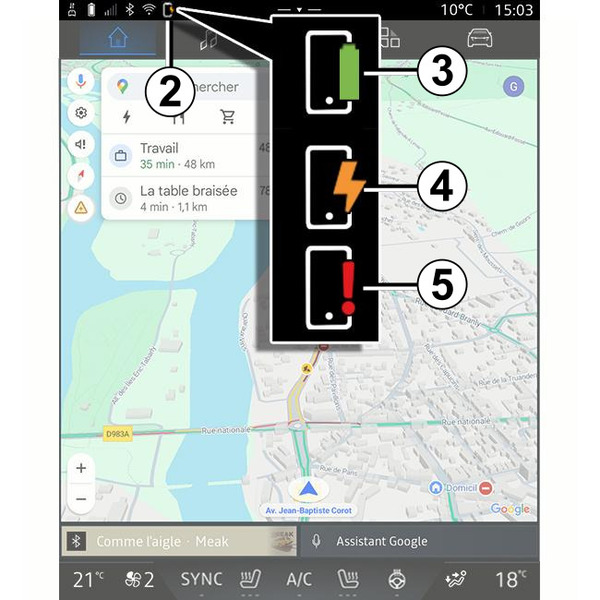
The multimedia system informs you of your phone's charging status 2:
- charging complete 3;
- charging in progress 4;
- object detected in the charging area/object overheating/charging procedure interrupted 5.
Note: the multimedia system will inform you if the phone charging procedure is interrupted.
Depending on the equipment, an colour indicator light located near the charging zone also informs you of the charging status:
- green when charging is complete;
- yellow when charging is in progress;
- flashes in yellow when a metal object is detected in the induction charging area;
- yellow or green switched off, accompanied by a message on the multimedia screen, when the charging zone temperature is too high.