ALPINE MULTIMEDIA SYSTEM
Screen controls
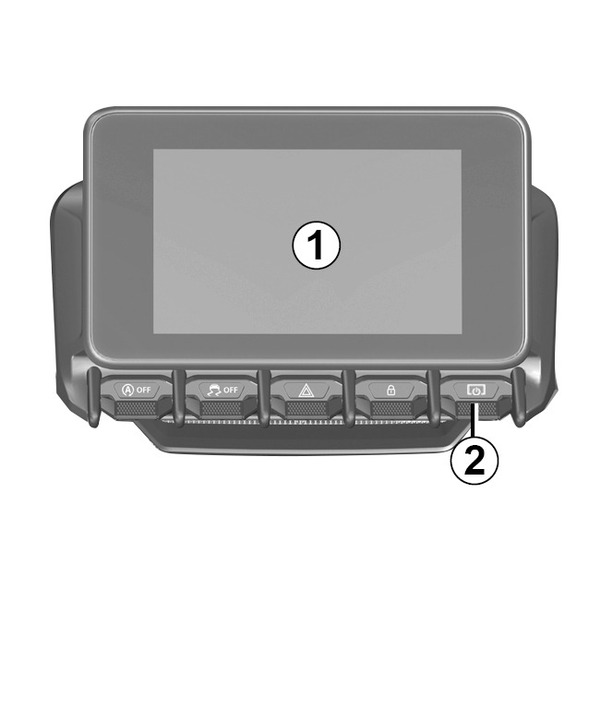

Functions
Function | |
|---|---|
1 | Multimedia screen. |
2 | Press and hold (approximately five seconds): restart the system. Press briefly: Radio/Music OFF, minimum display, standby. |
3 | Press briefly: choose the audio source. |
4 | Answer/end a call (phone mode) Upon reception of a second incoming call: reject the call (telephone mode). Activate voice recognition. |
5 | Increase the volume of the audio source currently in use. |
6 | Decrease the volume of the audio source currently in use. |
5 + 6 | Radio mute on/off. Pause or play the audio track. Interrupt the voice recognition voice synthesizer. |
7 | Press briefly: return to the previous screen. |
8 | Scroll through the radio presets/change track within a folder. |
Steering column controls
Functions
Function | |
|---|---|
1 | Multimedia screen. |
2 | Press and hold (approximately five seconds): restart the system. Press briefly: Radio/Music OFF, minimum display, standby. |
3 | Press briefly: choose the audio source. |
4 | Answer/end a call (phone mode) Upon reception of a second incoming call: reject the call (telephone mode). Activate voice recognition. |
5 | Increase the volume of the audio source currently in use. |
6 | Decrease the volume of the audio source currently in use. |
5 + 6 | Radio mute on/off. Pause or play the audio track. Interrupt the voice recognition voice synthesizer. |
7 | Press briefly: return to the previous screen. |
8 | Scroll through the radio presets/change track within a folder. |