ALPINE PORTAL
Cleaning recommendations
warning
Do not pour or spray the cleaning product on the screen.
Do not use chemical cleaning agents or household products. The device should not come into contact with any liquids and should not be exposed to dampness. If so, surfaces or electrical components may be degraded or damaged.
warning
Do not use products containing alcohol and/or spray fluids on the area.
Use only a clean, lint-free, soft dry micro-fibre cloth to clean the touchscreen so as not to damage the anti-glare materials.
Do not apply too much pressure on the multimedia screen and do not use cleaning equipment that may scratch the screen (e.g. brush, rough cloth, etc.).
"Cleaning screen" mode
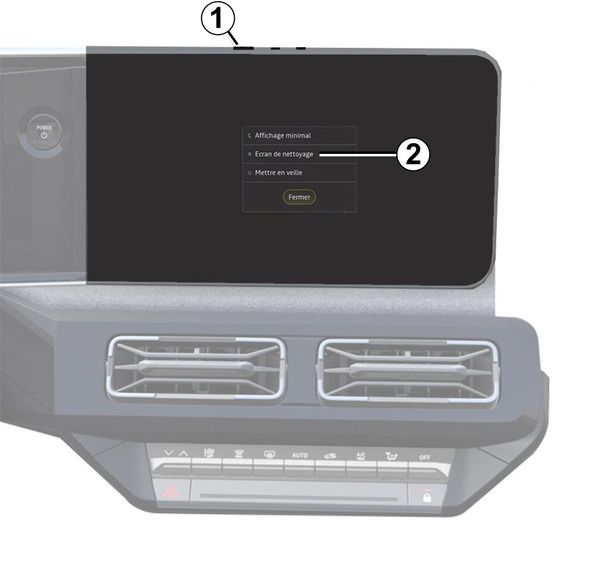
To use a micro-fibre cloth on the multimedia system screen when it is on, briefly press the control 1 on the multimedia panel, then press "Cleaning screen" 2 to set the touchscreen to inactive mode.
To exit the mode "Cleaning screen", press the multimedia screen twice.
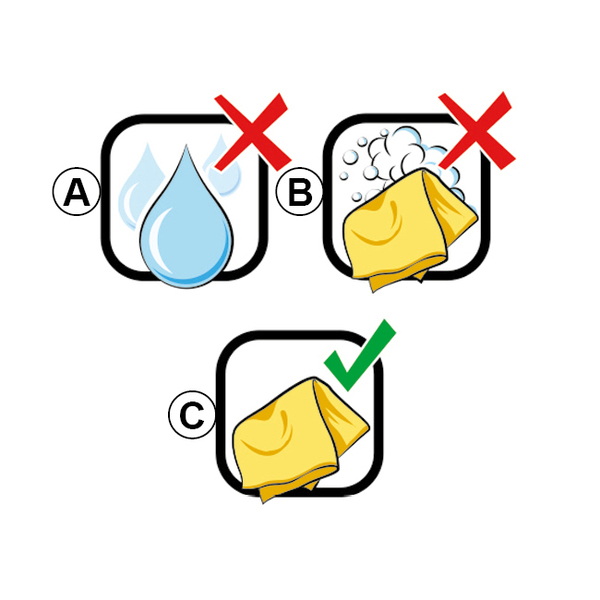
Observe the following cleaning recommendations:
- A.
: do not use alcohol-based fluids, do not apply or spray fluids;
- B.
: do not clean with soapy water using a slightly moistened micro-fibre cloth;
- C.
: dry clean using a micro-fibre cloth.