A110
Locking, unlocking the opening elements and doors
Locking/unlocking the doors from the outside
This is done using the card: refer to the information on "Cards" in Section 1.
In certain cases, the card may not work:
- when the card battery is drained, flat battery, etc.
- use of appliances operating on the same frequency as the card (mobile phone, etc.);
- the vehicle is located in a high electromagnetic radiation zone.
It is then possible:
- to use the card's built-in key to unlock the front left-hand door;
- to lock each of the doors manually;
- to use the interior door locking/unlocking control (refer to the following pages).
Using the key integrated in the card
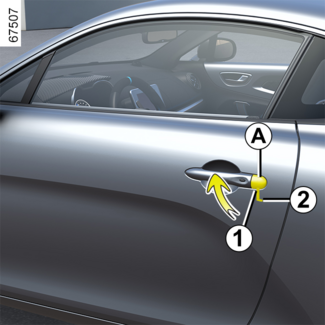
- Remove the cover A from the left-hand door by inserting the end of the key 2 into the notch 1;
- Move it upwards to remove the cover A;
- insert the key 2 into the lock and then lock or unlock the front left-hand door.
Locking the doors manually
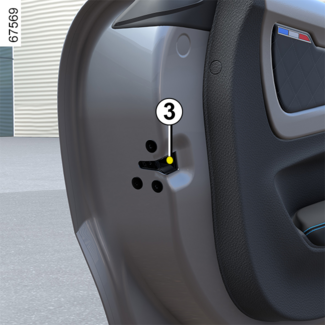
With the door open, pivot the bolt 3 (using the end of the built-in key) and close the door.
This means that the door is then locked from the outside.
The doors may then only be opened from the inside or by using the key in the front
left-hand door.
Interior locking/unlocking door control
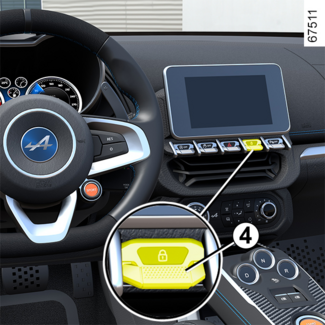
Switch 4 controls the doors, boot and, depending on the vehicle, the fuel filler flap simultaneously.
If one of the opening elements (door, luggage compartment or bonnet) is left open
or improperly closed, they lock and then quickly unlock.
If transporting an object which requires the luggage compartment to be left open,
you can still lock other opening elements: with the engine off, press and hold switch 4 for at least five seconds to lock the other opening elements.
Locking the doors without the card
For example, in the event of a discharged battery or the card temporarily not working,
etc.
With the ignition off and a door or the luggage compartment open, press and hold switch 4.
When the door is closed, all the doors and tailgate will be locked.
Unlocking the vehicle from the outside is only possible with the card in the vehicle's
access zone or using the key integrated into the card.
Tip
After locking/unlocking the vehicle using the buttons on the card, the "hands-free"
locking and unlocking is deactivated.
To reactivate the "hands-free" mode, restart the vehicle.
Door and tailgate status indicator
When the ignition is on, the indicator light integrated in switch 4 informs you of the locking status of the opening elements:
- when the warning light is on, the doors and luggage compartment door are locked;
- indicator light off, the doors and tailgate are unlocked.
When you lock the doors, the indicator light remains lit and then goes out.
WARNING
Never leave your vehicle with the card inside.
WARNING
Driver's responsibility
If you decide to keep the doors locked when you are driving, remember that it may
be more difficult for those assisting you to gain access to the passenger compartment
in the event of an emergency.